
Claude Code can help work inside an existing software project, but the quality of the result depends on scope, context, and verification. The goal is to change the intended behavior while preserving surrounding functionality and configuration. This guide describes an inspect-plan-change-check workflow for a small repository task, with clear acceptance criteria and a reviewable final difference.
What this workflow helps you do
This is a practical, evergreen workflow for claude code. Start with a small example and move to real work only after the result meets your requirements. The examples are hypothetical teaching scenarios, not claims about measured customer outcomes. Interfaces, account capabilities, and policies can change; use the official resources below to check current product details.
Worked example
Suppose a blog’s mobile navigation button opens the menu but does not update its accessible state. Ask Claude Code to inspect the navigation markup, script, and styling before editing. Define success as correct open and closed states, keyboard access, and no layout overflow. A focused change may update the state attribute and preserve the existing menu structure. Review the file difference, run the local preview, and test the actual button. The assistant should not replace the site framework, rotate credentials, or deploy to production as a side effect of a small navigation repair.
Important principles
Existing projects contain local conventions that matter. Read project instructions, dependency scripts, and the relevant implementation before choosing a solution. Keep an isolated working copy or clear version history so the change can be reviewed and reversed. A repository instruction file can describe useful commands and coding conventions, but it should not contain secrets or substitute for the user’s requested scope. Give the agent an observable definition of completion instead of asking it to improve the project without boundaries.
Step-by-step workflow
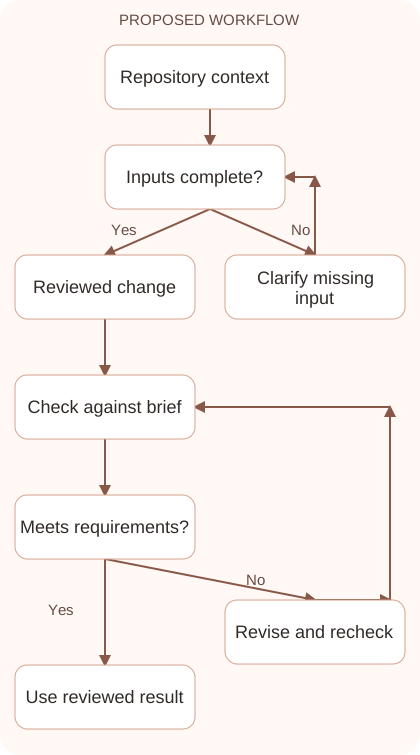
- Check the repository state and read its instructions. Identify existing uncommitted work and avoid treating unrelated changes as disposable while preparing the requested modification.
- Inspect the relevant files and describe acceptance criteria. Specify the user-visible behavior, important edge cases, and the constraints that make a solution suitable for this project.
- Request a concise implementation plan before a complex change. Resolve unclear dependencies early and prefer a focused edit that follows established patterns over unnecessary architectural replacement.
- Review the resulting difference and run appropriate checks. Test the behavior in its real context and inspect any errors rather than accepting a generated summary as verification.
- Prepare a clear handoff explaining what changed and how it was checked. Commit or deploy only within the authorized scope, preserving configuration and live data when production is involved.
Workflow graph
Reusable prompt
Inspect this repository’s instructions and mobile navigation implementation. Fix the menu’s accessible open/closed state without replacing the framework. Preserve unrelated changes. Acceptance: mouse and keyboard toggling work, state attributes match visibility, and the page fits at 320px. Explain changed files and verification results.Replace the bracketed fields with approved information. Keep the prompt as a draft template: the person responsible for the work must still check its output before using it.
Quality checks and troubleshooting
- The repository difference matches the requested scope.
- Verification tests the observable behavior.
- Existing configuration and unrelated work are preserved.
Define a stop condition for repository work. Once navigation visibility, accessible state, keyboard behavior, and narrow layout satisfy the criteria, further refactoring needs a concrete reason. Review unexpected lockfile or configuration changes and determine whether they are required. Preserve the checked working state before deployment. The handoff should explain actual behavior and verification rather than simply claim the project is improved. This gives another developer enough evidence to review the change without reconstructing every conversation turn.
| Stage | What to prepare | What to verify |
|---|---|---|
| Input | Approved information and a defined question | Relevant evidence or a reproducible example |
| Draft | A result that follows the requested format | No hidden assumptions or unsupported promises |
| Review | A check against the brief and original material | Correct facts, behavior, and important conditions |
| Handoff | A usable result with remaining limits stated | The next person knows what was checked |
Practice and improve the workflow
Run a small practice cycle before expanding this workflow. Choose an input whose correct result you already understand, complete the task once, and compare the output with your own independent check. Record the prompt, the source or example, the mistake you found, and the correction you accepted. Change only one important variable on the next attempt so you can see whether the improvement came from clearer context, a better instruction, or a more useful review step.
Keep a reviewed example as your baseline. When the task, source material, or tool changes, repeat the checks most likely to be affected. If a recurring defect appears, revise the process instead of patching the final wording every time. Save the useful structure while removing previous client details and obsolete assumptions. This habit makes the workflow easier to maintain and easier to explain to a teammate who did not see the original conversation.
Download the plain-text prompt and review checklist for your own practice notes.
10 frequently asked questions
What should I do before using Claude Code?
Understand the repository state, read project instructions, and define the task. Keep a recoverable working history before allowing edits to existing files.
What belongs in CLAUDE.md?
Useful project conventions, relevant commands, and architectural context can belong there. Keep it concise, accurate, and free of credentials or private access tokens.
Should I let it inspect before editing?
Yes. Understanding the existing implementation reduces unnecessary rewrites and helps the proposed change fit the project’s conventions and dependencies.
How detailed should acceptance criteria be?
Describe observable outcomes and important constraints. A specific behavior such as correct keyboard toggling is easier to verify than a broad request for better quality.
Can Claude Code deploy automatically?
Deployment depends on configured access and authorization. Treat production changes as a distinct step with backups and checks of the actual live result.
How do I protect existing local work?
Inspect uncommitted changes and identify their ownership. Use version history or a separate checkout, and avoid removing unrelated files to simplify the task.
What should I review in the final difference?
Check changed files, scope, dependencies, configuration edits, and user-visible behavior. Ensure the patch solves the stated issue without introducing unrelated changes.
Are passing tests enough?
Tests provide evidence for the cases they cover. Add a local visual or interaction check when the change affects layout, navigation, or another user-facing behavior.
What if the tool reports success without proof?
Ask for the actual check performed and its result. Reproduce the important behavior yourself when the report lacks evidence or leaves uncertainty unresolved.
How do I make future tasks easier?
Keep accurate project instructions and meaningful verification commands. Record decisions that affect later changes without filling the repository with redundant process documents.
Resources and related guides
Official documentation supports current product details; the worked examples, diagrams, and review routines on this page are editorial recommendations. Check relevant account settings and organizational rules before using a feature with real work.
Continue with the Claude for Coding: Understand, Debug, and Review Code to develop a related skill, or use the Claude AI Automation: Design Reliable Workflows for the next practical task. For another assistant’s approach, compare the related ChatGPT or AI workflow guide.