
Claude can help explain and debug code when you supply enough context to reproduce the problem. The most reliable workflow starts with observed behavior, narrows the cause, and checks a focused change. This guide shows how to ask for coding help without accepting a large rewrite that hides the original bug or creates new problems elsewhere in your application.
What this workflow helps you do
This is a practical, evergreen workflow for claude for coding. Start with a small example and move to real work only after the result meets your requirements. The examples are hypothetical teaching scenarios, not claims about measured customer outcomes. Interfaces, account capabilities, and policies can change; use the official resources below to check current product details.
Worked example
Imagine a task filter should show only completed tasks, but the page still includes unfinished items. Provide a minimal sample array, the filter function, the expected result, and the actual result. Ask Claude to identify likely causes before changing the code. It may reveal that the status values use different capitalization or that the condition checks the wrong property. Test the proposed fix on completed, incomplete, and missing-status records. A short change with a clear explanation is easier to review than replacing the entire task interface.
Important principles
A useful bug report separates observations from theories. Include the exact error message when there is one, but remove secrets, tokens, and unrelated customer data. Describe the runtime and dependencies that influence the behavior. Ask for a minimal fix and a meaningful verification step, then review the difference before applying it. Passing one test does not prove every feature works, so check the adjacent behavior most likely affected by the change.
Step-by-step workflow
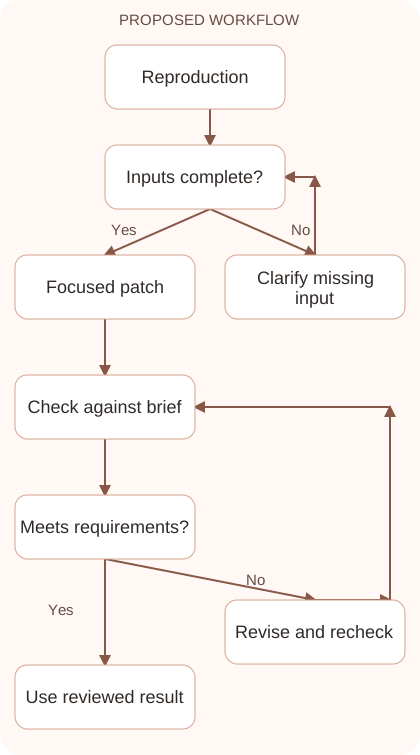
- Create a minimal reproducible example with input, expected output, and actual output. Keep enough context to preserve the bug while removing unrelated code and sensitive information.
- Describe the environment and recent changes. State the language, runtime, relevant library versions, and any configuration detail necessary to understand the failure accurately.
- Ask for a diagnosis and a focused patch. Require an explanation of why the proposed change addresses the observed behavior and what existing assumptions it depends on.
- Review the changed lines before running them. Check for broader rewrites, new dependencies, destructive commands, or edits to configuration files that were not needed for the fix.
- Run relevant tests and inspect affected neighboring behavior. Record the result and keep the reproduction example so the same bug can be checked after future changes.
Workflow graph
Reusable prompt
Debug this function using the supplied example. Expected result: [result]. Actual result: [result]. Environment: [runtime]. Code: [minimal snippet]. Explain the likely cause, propose the smallest reasonable fix, and provide tests for the normal case, a mismatch, and a missing value. Do not rewrite unrelated features.Replace the bracketed fields with approved information. Keep the prompt as a draft template: the person responsible for the work must still check its output before using it.
Quality checks and troubleshooting
- The proposed fix reproduces and resolves the observed bug.
- The patch stays within the relevant scope.
- Neighboring behavior remains correct after the change.
Distinguish a fix for the cause from a change that hides the symptom. Inconsistent status values may need input validation rather than only a display adjustment. Ask where normalization belongs and choose a focused solution consistent with the application. Keep an example that fails under the previous behavior. Check the empty results screen as well, because a corrected filter may expose an untested state. Record the cause, relevant patch, and evidence that the intended behavior now works.
| Stage | What to prepare | What to verify |
|---|---|---|
| Input | Approved information and a defined question | Relevant evidence or a reproducible example |
| Draft | A result that follows the requested format | No hidden assumptions or unsupported promises |
| Review | A check against the brief and original material | Correct facts, behavior, and important conditions |
| Handoff | A usable result with remaining limits stated | The next person knows what was checked |
Practice and improve the workflow
Run a small practice cycle before expanding this workflow. Choose an input whose correct result you already understand, complete the task once, and compare the output with your own independent check. Record the prompt, the source or example, the mistake you found, and the correction you accepted. Change only one important variable on the next attempt so you can see whether the improvement came from clearer context, a better instruction, or a more useful review step.
Keep a reviewed example as your baseline. When the task, source material, or tool changes, repeat the checks most likely to be affected. If a recurring defect appears, revise the process instead of patching the final wording every time. Save the useful structure while removing previous client details and obsolete assumptions. This habit makes the workflow easier to maintain and easier to explain to a teammate who did not see the original conversation.
Download the plain-text prompt and review checklist for your own practice notes.
10 frequently asked questions
Can Claude debug code?
It can inspect examples and propose fixes. Verify the diagnosis by reproducing the problem and running a meaningful check in your own environment.
What makes a good debugging prompt?
Include the code, input, expected result, actual result, and relevant environment. A clear reproduction is more helpful than a general request to fix everything.
Should I paste the entire repository?
Start with the smallest relevant context. Include additional files only when needed to understand dependencies or behavior, and remove secrets before sharing.
What if the proposed fix is a large rewrite?
Ask for a narrower patch and an explanation of why each change is necessary. A broad rewrite can make the original cause harder to identify.
Can I run suggested commands immediately?
Review what each command does first. Be especially careful with file removal, environment changes, dependency installation, and commands affecting production systems.
How do I verify a bug fix?
Run the reproduction example, test edge cases, and check adjacent behavior. A successful command exit does not alone prove the application behaves correctly.
Should I add a test for every small change?
Use a meaningful check suited to the behavior and risk. Avoid tests that merely repeat the implementation without catching a realistic failure.
What if Claude refers to an unavailable function?
Check the official documentation for your actual library version. Generated code may assume a different API or feature than your environment provides.
How do I prevent secret leakage?
Remove credentials, tokens, private connection strings, and unnecessary personal data from examples. Use synthetic values that still reproduce the problem.
What should I keep after debugging?
Save the reproduction, focused patch, explanation, and verification result. These records make future regressions easier to diagnose and review.
Resources and related guides
Official documentation supports current product details; the worked examples, diagrams, and review routines on this page are editorial recommendations. Check relevant account settings and organizational rules before using a feature with real work.
Continue with the Claude Code: A Careful Workflow for Existing Projects to develop a related skill, or use the Build a Website with Claude: A Beginner’s Workflow for the next practical task. For another assistant’s approach, compare the related ChatGPT or AI workflow guide.