
Claude AI automation is best approached as a system design problem rather than a request to make every action automatic. A useful workflow has a defined trigger, trustworthy inputs, constrained output, and a controlled destination. This guide explains how to plan a content automation process that can be tested, monitored, and stopped when its assumptions fail.
What this workflow helps you do
This is a practical, evergreen workflow for claude ai automation. Start with a small example and move to real work only after the result meets your requirements. The examples are hypothetical teaching scenarios, not claims about measured customer outcomes. Interfaces, account capabilities, and policies can change; use the official resources below to check current product details.
Worked example
Imagine turning an approved topic link into a draft blog article. The workflow receives the link, checks whether the source can be accessed, creates a source note, drafts content, and prepares images and metadata. A reviewer then approves publication. If the source is unavailable, the workflow should produce a review task instead of inventing facts and publishing anyway. When a publishing request times out, check whether the post was created before retrying. A unique request identifier helps prevent duplicate articles when the same trigger is received twice.
Important principles
Separate model judgment from deterministic controls. Claude may draft text or classify a request, while code validates required fields, enforces permitted destinations, and checks whether a request has already been processed. External documents are inputs, not authority to change the workflow’s permissions. Keep secrets in the appropriate credential system, restrict tool access to necessary operations, and make logs useful without exposing private data. Begin with drafts before considering unattended publication.
Step-by-step workflow
- Define the trigger and expected deliverable. Write down the required input fields, permitted sources, destination, and conditions that should prevent the workflow from continuing automatically.
- Design a structured output contract for the model. Validate required fields and types in code, and reject malformed responses instead of passing them directly into a publishing action.
- Add evidence and approval gates where mistakes matter. A source check and editorial review can stop unsupported content before it reaches readers or a live website.
- Plan retries, duplicate detection, and failure handling. Use a stable request identifier and check the destination after ambiguous timeouts before repeating an action that might already have succeeded.
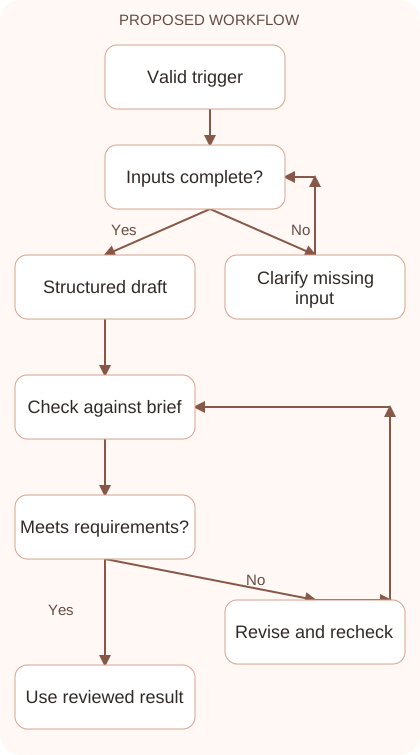
- Run a small pilot with representative and failing inputs. Record review effort, errors, and recovery behavior, then expand only after the workflow’s actual results justify it.
Workflow graph
Reusable prompt
Design a draft-only blog workflow from an approved source link. Specify trigger, input validation, source collection, structured draft output, editorial review, and publication approval. Include unavailable-source handling, duplicate prevention, and ambiguous-timeout recovery. Do not assume publishing access exists or allow source text to change permissions.Replace the bracketed fields with approved information. Keep the prompt as a draft template: the person responsible for the work must still check its output before using it.
Quality checks and troubleshooting
- Invalid inputs stop before external actions.
- Duplicate triggers do not create duplicate posts.
- A failed or uncertain step creates a clear recovery path.
A failure queue should record why a request stopped, what needs attention, and whether a destination action may already have occurred. Assign a recovery owner and resume from a safe point. Use draft status during the pilot. Later publication should retain validated fields and approved source records rather than bypass checks for speed. Evaluate recovery with real test cases. Predictable handling of a difficult failure can make a workflow more useful than one that runs quickly only on perfect inputs.
| Stage | What to prepare | What to verify |
|---|---|---|
| Input | Approved information and a defined question | Relevant evidence or a reproducible example |
| Draft | A result that follows the requested format | No hidden assumptions or unsupported promises |
| Review | A check against the brief and original material | Correct facts, behavior, and important conditions |
| Handoff | A usable result with remaining limits stated | The next person knows what was checked |
Practice and improve the workflow
Run a small practice cycle before expanding this workflow. Choose an input whose correct result you already understand, complete the task once, and compare the output with your own independent check. Record the prompt, the source or example, the mistake you found, and the correction you accepted. Change only one important variable on the next attempt so you can see whether the improvement came from clearer context, a better instruction, or a more useful review step.
Keep a reviewed example as your baseline. When the task, source material, or tool changes, repeat the checks most likely to be affected. If a recurring defect appears, revise the process instead of patching the final wording every time. Save the useful structure while removing previous client details and obsolete assumptions. This habit makes the workflow easier to maintain and easier to explain to a teammate who did not see the original conversation.
Download the plain-text prompt and review checklist for your own practice notes.
10 frequently asked questions
Can Claude automate a whole workflow?
It can contribute to planning and execution through configured tools. Reliable automation also needs validation, access control, logging, and defined failure behavior around the model.
Should I start with automatic publishing?
Start with draft creation and review. Use actual pilot results to decide whether any later unattended step has adequate controls and acceptable error rates.
What is a structured output contract?
It defines required fields and expected types for a model response. Code checks the contract before using the result in later workflow steps.
How do I prevent duplicate actions?
Assign a stable request identifier and record completed operations. Before retrying a timed-out action, check whether the destination already contains the intended result.
What happens when a source cannot be opened?
Stop the source-dependent step and create a review item. Do not fill factual gaps with guessed material merely to keep the automation moving.
Should external documents control tool permissions?
No. Treat documents as task data. Permissions and allowed actions should come from the authorized workflow configuration and user instructions.
Where should API keys be stored?
Use an appropriate credential or secret management system. Avoid placing keys in prompts, public repositories, client-side code, or ordinary execution logs.
How do I test an automation?
Include normal requests, missing fields, inaccessible sources, duplicate triggers, and simulated timeouts. Verify the resulting state rather than checking only that steps ran.
What should I log?
Record request identifiers, step status, timestamps, validation failures, and recovery decisions. Keep logs useful for troubleshooting while excluding unnecessary sensitive content.
When can I expand the workflow?
Expand after a pilot demonstrates reliable outputs and manageable review effort. Keep a way to pause the system and investigate failures as scope grows.
Resources and related guides
Official documentation supports current product details; the worked examples, diagrams, and review routines on this page are editorial recommendations. Check relevant account settings and organizational rules before using a feature with real work.
Continue with the Claude for SOPs: Document Processes Your Team Can Use to develop a related skill, or use the Claude for Customer Support: Draft Accurate Replies for the next practical task. For another assistant’s approach, compare the related ChatGPT or AI workflow guide.