
Building a website with Claude becomes more manageable when you split the work into requirements, a small implementation, and visible checks. The aim is a usable site that represents your content accurately, not a large code response you cannot maintain. This guide outlines a beginner workflow for a service website, including responsive layout, navigation, and a clear path from local preview to deployment.
What this workflow helps you do
This is a practical, evergreen workflow for build a website with claude. Start with a small example and move to real work only after the result meets your requirements. The examples are hypothetical teaching scenarios, not claims about measured customer outcomes. Interfaces, account capabilities, and policies can change; use the official resources below to check current product details.
Worked example
Suppose you need a three-page website for a small creative agency: home, services, and contact. Before generating code, write the content and define what each page should help visitors do. Ask Claude to create a minimal first version with consistent navigation and a contact section. If the form has no backend, label its behavior honestly rather than showing a false success message. Preview the site locally, test at a narrow width, and click every navigation link. Deployment is a separate step requiring the correct hosting configuration and preserved server credentials.
Important principles
A website brief should distinguish visual preferences from functional requirements. Light colors and generous spacing guide design; submitting a contact request requires an actual implementation and destination. Work in small changes so a broken layout or link can be traced to its cause. Keep a backup or version history, and review generated code before installing dependencies or running commands. Accessibility, content accuracy, and reliable behavior deserve attention throughout development rather than becoming last-minute extras.
Step-by-step workflow
- Define pages, content, and primary visitor actions. Write the actual headings and service details so Claude does not invent business claims or substitute generic placeholder material.
- Request a small working structure using your chosen technology. Explain the existing folder layout and ask it to preserve configuration files and content outside the agreed change.
- Review the first local preview for navigation and content flow. Fix missing sections and unclear calls to action before adding elaborate animations, decorative graphics, or extra functionality.
- Test responsive behavior and interactive controls. Check small screens, keyboard navigation, image loading, form validation, and whether any success message corresponds to a real completed action.
- Prepare deployment with a backup and an explicit file list. Preserve live-only configuration and data, then verify the public site after upload rather than assuming local success guarantees production behavior.
Workflow graph
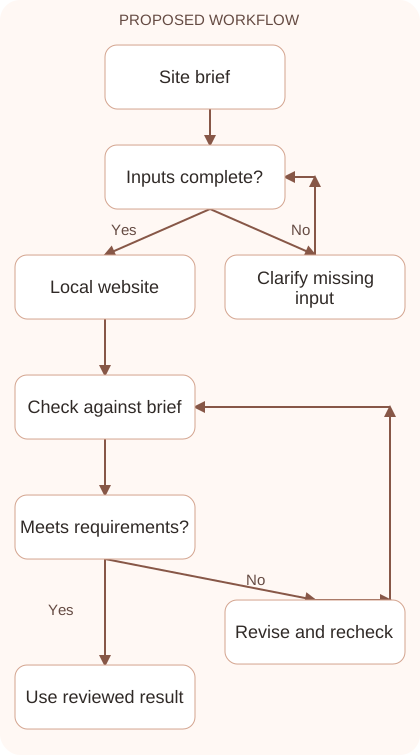
Reusable prompt
Create a small responsive service website with home, services, and contact pages using [technology]. Use this approved content: [content]. Keep navigation consistent and make forms honest about their implementation. Explain the files changed and how to preview locally. Do not overwrite hosting configuration or add unsupported service claims.Replace the bracketed fields with approved information. Keep the prompt as a draft template: the person responsible for the work must still check its output before using it.
Quality checks and troubleshooting
- All navigation links reach the intended page.
- Mobile content fits without horizontal page overflow.
- Forms and buttons accurately reflect implemented behavior.
Plan deployment early enough to influence implementation. A static contact link differs from a server-side form, and image paths can change when a site moves to another folder. Avoid scattering localhost addresses through the code. Keep credentials outside public scripts. After upload, test an inner page as well as the homepage, then inspect navigation, images, and the contact action. Compare production failures with the changed files and environment before replacing larger parts of the site unnecessarily.
| Stage | What to prepare | What to verify |
|---|---|---|
| Input | Approved information and a defined question | Relevant evidence or a reproducible example |
| Draft | A result that follows the requested format | No hidden assumptions or unsupported promises |
| Review | A check against the brief and original material | Correct facts, behavior, and important conditions |
| Handoff | A usable result with remaining limits stated | The next person knows what was checked |
Practice and improve the workflow
Run a small practice cycle before expanding this workflow. Choose an input whose correct result you already understand, complete the task once, and compare the output with your own independent check. Record the prompt, the source or example, the mistake you found, and the correction you accepted. Change only one important variable on the next attempt so you can see whether the improvement came from clearer context, a better instruction, or a more useful review step.
Keep a reviewed example as your baseline. When the task, source material, or tool changes, repeat the checks most likely to be affected. If a recurring defect appears, revise the process instead of patching the final wording every time. Save the useful structure while removing previous client details and obsolete assumptions. This habit makes the workflow easier to maintain and easier to explain to a teammate who did not see the original conversation.
Download the plain-text prompt and review checklist for your own practice notes.
10 frequently asked questions
Can Claude build a website for a beginner?
It can help generate and explain code. Start with a small scope, preview locally, and learn enough of the structure to review and maintain changes.
Should I request every feature at once?
Build the core pages and main interactions first. Smaller changes are easier to test and make failures less difficult to diagnose.
What content should I provide?
Supply verified business details, service scope, headings, contact information, and intended visitor actions. This reduces generic filler and invented promises.
How do I test mobile design?
Preview several narrow widths and use every important control. Look for clipped text, oversized images, hidden navigation, and content that forces horizontal page scrolling.
Does a contact form work automatically?
A visible form needs a real submission mechanism and destination. Test it end to end rather than trusting a generated confirmation message.
Can I publish directly after local testing?
Prepare a backup and check hosting requirements first. Production configuration, routes, permissions, and data may differ from your local environment.
Should I overwrite all hosting files?
Upload the reviewed change set and preserve live configuration and data. Replacing a whole folder can remove server-specific settings or newer content.
What accessibility checks matter first?
Check meaningful labels, contrast, keyboard access, visible focus, and readable text. These basics support real visitors more directly than decorative complexity.
How do I handle generated code I do not understand?
Ask for an explanation of the affected files and behavior. Keep the change small and avoid running unfamiliar commands until their purpose is clear.
What should I verify after deployment?
Open the public pages, load images, test navigation and forms, and inspect mobile layouts. Confirm the actual live result rather than relying only on upload completion.
Resources and related guides
Official documentation supports current product details; the worked examples, diagrams, and review routines on this page are editorial recommendations. Check relevant account settings and organizational rules before using a feature with real work.
- Anthropic prompting guidance
- Anthropic guidance on reducing hallucinations
- Official Claude Artifacts guide
Continue with the Claude Artifacts: Build and Review Useful Deliverables to develop a related skill, or use the Claude for Coding: Understand, Debug, and Review Code for the next practical task. For another assistant’s approach, compare the related ChatGPT or AI workflow guide.