
Claude can help build a study routine that makes you recall, explain, and apply material instead of repeatedly rereading it. The most useful role is a practice partner working from reliable course notes. This guide explains how to create a small self-testing loop, check feedback, and revisit weak areas without treating generated answers as a replacement for your teacher or authoritative materials.
What this workflow helps you do
This is a practical, evergreen workflow for claude for studying. Start with a small example and move to real work only after the result meets your requirements. The examples are hypothetical teaching scenarios, not claims about measured customer outcomes. Interfaces, account capabilities, and policies can change; use the official resources below to check current product details.
Worked example
Suppose you are learning the difference between scope, schedule, and risk in project management. Provide your approved notes and ask Claude for a short scenario where you must identify all three. Answer before requesting the solution. Then compare the feedback with the definitions in your notes. If your answer correctly identifies a risk but uses different wording, ask for a distinction between conceptual mistakes and style differences. Your next exercise should target the mistaken concept rather than repeat the entire lesson from the beginning.
Important principles
Good practice balances difficulty and feedback. Questions should require retrieval or application, not simply invite agreement with a model explanation. Ask for hints before full answers when you are stuck, and keep a record of mistakes in your own words. Generated quizzes can contain ambiguous questions or incorrect solutions, so check a sample against the course source. Use Claude to structure practice sessions while retaining responsibility for honest learning and any academic rules that apply.
Step-by-step workflow
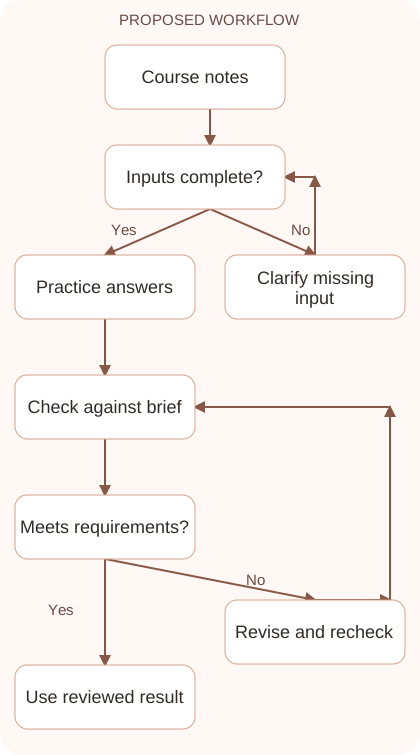
- Select a narrow learning objective and a reliable source. Identify the specific concept or skill you want to demonstrate rather than asking to master a whole subject immediately.
- Request a few practice questions with answers withheld. Include a mixture of explanation and application so you can reveal gaps that recognition-only questions might hide.
- Answer independently before reviewing feedback. Write your reasoning briefly, then ask Claude to assess it using the supplied definitions and identify any uncertain part of its evaluation.
- Verify difficult feedback against the original notes. Keep a mistake log distinguishing missing knowledge, misunderstood terms, and careless reading so your next exercise targets the correct problem.
- Return to selected questions after a break. Change the scenario while testing the same concept, then check whether you can apply it without relying on the wording of a memorized answer.
Workflow graph
Reusable prompt
Use these course notes to create five practice questions about [concept]. Include two application scenarios. Do not show answers yet. After I respond, assess my answers against the notes, explain mistakes concisely, and flag anything the notes do not establish. Notes: [approved material].Replace the bracketed fields with approved information. Keep the prompt as a draft template: the person responsible for the work must still check its output before using it.
Quality checks and troubleshooting
- Questions match the selected learning objective.
- Feedback is checked against the course source.
- The next session targets recorded mistakes rather than random new material.
Keep a brief mistake log. If you classify an existing delay as a future risk, record the corrected distinction and create another scenario that tests it. Withhold the answer until you respond. Changing the scenario reveals whether you understand the concept or only remember the wording. Review a few earlier mistakes before introducing new topics. If feedback remains ambiguous, return to the course material rather than arguing indefinitely with the assistant. Aim to demonstrate understanding independently when the question changes.
| Stage | What to prepare | What to verify |
|---|---|---|
| Input | Approved information and a defined question | Relevant evidence or a reproducible example |
| Draft | A result that follows the requested format | No hidden assumptions or unsupported promises |
| Review | A check against the brief and original material | Correct facts, behavior, and important conditions |
| Handoff | A usable result with remaining limits stated | The next person knows what was checked |
Practice and improve the workflow
Run a small practice cycle before expanding this workflow. Choose an input whose correct result you already understand, complete the task once, and compare the output with your own independent check. Record the prompt, the source or example, the mistake you found, and the correction you accepted. Change only one important variable on the next attempt so you can see whether the improvement came from clearer context, a better instruction, or a more useful review step.
Keep a reviewed example as your baseline. When the task, source material, or tool changes, repeat the checks most likely to be affected. If a recurring defect appears, revise the process instead of patching the final wording every time. Save the useful structure while removing previous client details and obsolete assumptions. This habit makes the workflow easier to maintain and easier to explain to a teammate who did not see the original conversation.
Download the plain-text prompt and review checklist for your own practice notes.
10 frequently asked questions
Can Claude help me study?
It can organize explanations and practice questions. Use reliable materials and verify important feedback rather than treating generated content as an unquestionable course authority.
Should I ask for answers immediately?
Try answering first. Withholding solutions gives you a clearer picture of what you can recall and where you need another explanation or example.
What is a good study prompt?
Name the objective, provide approved notes, specify the question type, and ask to withhold answers. Describe how you want feedback assessed afterward.
How do I check a generated quiz?
Compare questions and solutions with your course material. Look for ambiguous wording, unsupported details, and answer choices that test accidental phrasing rather than understanding.
What if Claude marks a correct answer wrong?
Ask it to cite the supplied definition and explain the mismatch. Review the source yourself and separate wording differences from genuine conceptual errors.
Can I use it for exam preparation?
Use it for permitted practice and revision. Follow your institution’s rules, especially for assessed work, and prioritize the official syllabus and sample examinations.
How can I make questions harder?
Ask for a new scenario requiring the same concept, an explanation of tradeoffs, or a comparison between similar ideas rather than merely adding obscure facts.
Should I maintain a mistake log?
Yes. Record the question, your error, the corrected concept, and a follow-up exercise. This makes later revision more focused than reviewing everything equally.
Can Claude explain in simpler English?
Ask for familiar words and a concrete example while preserving the technical definition. Check that simplification does not remove important conditions or distinctions.
How long should a session be?
Choose a manageable block with a clear objective and review point. The useful measure is what you can explain afterward, not the number of messages exchanged.
Resources and related guides
Official documentation supports current product details; the worked examples, diagrams, and review routines on this page are editorial recommendations. Check relevant account settings and organizational rules before using a feature with real work.
Continue with the How to Use Claude: A Practical Beginner’s Guide to develop a related skill, or use the Claude Prompting: Write Clear, Repeatable Instructions for the next practical task. For another assistant’s approach, compare the related ChatGPT or AI workflow guide.