
Claude Artifacts are useful when a conversation needs to become a concrete deliverable that you can inspect and revise. The important distinction is between generating an attractive first version and producing something ready for real use. This guide covers a brief-to-review workflow for an interactive checklist, with attention to correct behavior, accessible design, and deliberate sharing.
What this workflow helps you do
This is a practical, evergreen workflow for claude artifacts. Start with a small example and move to real work only after the result meets your requirements. The examples are hypothetical teaching scenarios, not claims about measured customer outcomes. Interfaces, account capabilities, and policies can change; use the official resources below to check current product details.
Worked example
Imagine you want a checklist for preparing blog posts. Your requirements include a title review, source verification, image approval, and a final publishing decision. Ask for a small prototype that keeps the checklist state understandable and makes incomplete items obvious. Test whether the completion status updates when an item is unchecked as well as checked. A polished progress indicator is not enough if the underlying state is wrong. If you later need the checklist connected to your website, treat that integration as a separate development task with its own permissions and tests.
Important principles
Define the artifact’s purpose before choosing its visual style. A dashboard, document, or interactive prototype needs an audience, a clear input, and a useful output. Separate sample content from real data, and label any simulated behavior. If the artifact appears to save, submit, or fetch information, check whether those actions actually exist. A preview can demonstrate an interface without establishing a production backend, reliable storage, or an approved publishing workflow.
Step-by-step workflow
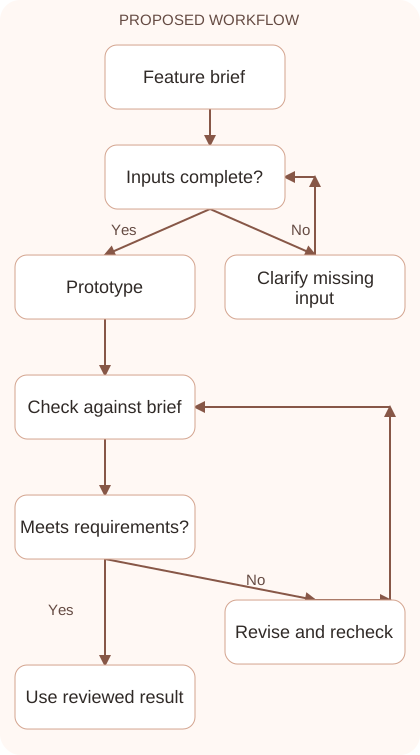
- Write a short acceptance brief describing the audience, essential functions, and visible content. Include what the prototype should demonstrate and which integrations are outside the current scope.
- Request the smallest useful first version. A checklist with correct interactions is easier to validate than an elaborate application with several unfinished screens and unexplained behavior.
- Test the normal path and reversal actions. Check adding, completing, undoing, and editing items, then inspect empty states and any messages that might imply data was saved.
- Review accessibility on a narrow screen. Confirm readable labels, sufficient contrast, keyboard use, and clear focus behavior before spending time on decorative details or extra animations.
- Export or share deliberately using the options available in your account. Inspect what viewers can access and preserve a reviewed version before making further changes.
Workflow graph
Reusable prompt
Build a simple blog preparation checklist prototype with four tasks: verify sources, edit text, approve image, and approve publishing. Allow checking and unchecking. Show completion clearly. Use accessible labels and a mobile-friendly layout. Do not claim data is saved remotely. Explain any limitations after the prototype.Replace the bracketed fields with approved information. Keep the prompt as a draft template: the person responsible for the work must still check its output before using it.
Quality checks and troubleshooting
- Checked and unchecked states behave consistently.
- Sample interactions do not imply unimplemented external actions.
- The deliverable remains usable with a keyboard and a small screen.
For an interactive checklist, start with all items unchecked, complete them, then undo one. Confirm the completion display returns to an incomplete state. Try keyboard navigation and a longer task label to reveal focus and wrapping problems. If a reset button exists, check the actual state after using it. Keep acceptance criteria beside the artifact while reviewing. A visual revision that breaks an interaction should be narrowed or corrected before you share the result as a working prototype.
| Stage | What to prepare | What to verify |
|---|---|---|
| Input | Approved information and a defined question | Relevant evidence or a reproducible example |
| Draft | A result that follows the requested format | No hidden assumptions or unsupported promises |
| Review | A check against the brief and original material | Correct facts, behavior, and important conditions |
| Handoff | A usable result with remaining limits stated | The next person knows what was checked |
Practice and improve the workflow
Run a small practice cycle before expanding this workflow. Choose an input whose correct result you already understand, complete the task once, and compare the output with your own independent check. Record the prompt, the source or example, the mistake you found, and the correction you accepted. Change only one important variable on the next attempt so you can see whether the improvement came from clearer context, a better instruction, or a more useful review step.
Keep a reviewed example as your baseline. When the task, source material, or tool changes, repeat the checks most likely to be affected. If a recurring defect appears, revise the process instead of patching the final wording every time. Save the useful structure while removing previous client details and obsolete assumptions. This habit makes the workflow easier to maintain and easier to explain to a teammate who did not see the original conversation.
Download the plain-text prompt and review checklist for your own practice notes.
10 frequently asked questions
What is an artifact in Claude?
It is a concrete output such as a document, design, dashboard, or interactive tool. Check the current official guidance for the formats your account supports.
Is a generated artifact ready for production?
Treat it as a draft until you verify behavior, content, accessibility, and required integrations. Visual polish alone does not prove operational reliability.
Can I ask Claude to revise one part?
Describe the specific element and the required change. Preserve the parts that already work, then test the affected interaction again after the revision.
Why might the artifact option be missing?
Available capabilities and settings vary. Consult the current help page and your organization’s administrator rather than assuming an interface shown in an old tutorial still applies.
Can an artifact store user information?
Check the actual implementation and service connections. Do not assume persistent or remote storage exists because a prototype includes a save button or confirmation message.
How do I test an interactive checklist?
Check and uncheck each item, reload if relevant, and try an empty list. Confirm the visible status matches the underlying selections throughout the interaction.
Should I use real customer data in a prototype?
Use synthetic examples whenever possible. Real data requires approved access, appropriate handling, and a clear reason for being included in the prototype.
Can I share an artifact publicly?
Check the current sharing controls and who can view it. Remove private information and review the whole deliverable before using a public or external sharing option.
How do I check mobile usability?
Open the result at a narrow width and use its main controls. Look for clipped text, hidden buttons, oversized tables, and actions that depend only on hovering.
What should I save after reviewing?
Keep the approved output, its requirements, and a short list of tested behaviors. This makes future changes easier to assess against a known working version.
Resources and related guides
Official documentation supports current product details; the worked examples, diagrams, and review routines on this page are editorial recommendations. Check relevant account settings and organizational rules before using a feature with real work.
- Anthropic prompting guidance
- Anthropic guidance on reducing hallucinations
- Official Claude Artifacts guide
Continue with the Build a Website with Claude: A Beginner’s Workflow to develop a related skill, or use the Claude for Coding: Understand, Debug, and Review Code for the next practical task. For another assistant’s approach, compare the related ChatGPT or AI workflow guide.