
Good Claude prompts make a task easier to interpret and easier to judge. The most useful prompt is usually a clear working brief with relevant context, a defined deliverable, and a few important boundaries. This guide develops a reusable prompting method for everyday work, including a worked example, a template, and a review routine that prevents polished but unsuitable output from becoming your final deliverable.
What this workflow helps you do
This is a practical, evergreen workflow for claude prompting. Start with a small example and move to real work only after the result meets your requirements. The examples are hypothetical teaching scenarios, not claims about measured customer outcomes. Interfaces, account capabilities, and policies can change; use the official resources below to check current product details.
Worked example
Suppose a client wants a shorter description for a website development service. The source paragraph says the team builds responsive websites and provides two revision rounds; it does not promise hosting or ongoing maintenance. An unclear prompt asking for persuasive copy could introduce those services. A better brief identifies business owners as the audience, limits the output to a short paragraph, lists the two verified services, and forbids extra promises. You can then compare the draft against the actual offer rather than debating whether it sounds impressive.
Important principles
Treat instructions, source material, and examples as different parts of the brief. Labeling them helps readers as well as the model. An example should demonstrate the tone or structure you want, not silently introduce new facts. If you provide a sample from another company, say which aspects to emulate and which details must never be copied. Request a concise explanation of important assumptions when the task is ambiguous, and decide whether those assumptions are acceptable before approving the draft.
Step-by-step workflow
- Write a one-sentence goal that names the audience and deliverable. A service description for small business owners is more actionable than a vague instruction to create excellent content.
- Attach the smallest useful source set. Remove unrelated history, outdated offers, and duplicate notes that could conflict with the current brief or encourage accidental mixing of information.
- State non-negotiable requirements separately. Word limits, required terms, prohibited claims, and format rules should be visible rather than buried in a long paragraph about your preferences.
- Provide one representative example when style matters. Explain why it works, such as its direct opening or short sentences, without asking Claude to reproduce its facts or distinctive language.
- Review a sample output and revise one instruction at a time. Save a versioned template once it consistently produces drafts that need only manageable, predictable corrections.
Workflow graph
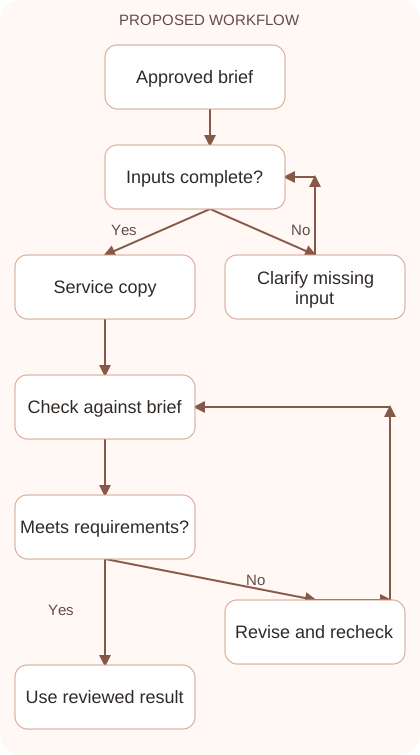
Reusable prompt
Goal: rewrite a service description for small business owners. Sources: [verified services]. Audience: nontechnical readers. Output: one paragraph under 100 words. Preserve: two revision rounds. Exclude: hosting and maintenance promises. Tone: clear and professional. If a necessary fact is missing, ask before adding it.Replace the bracketed fields with approved information. Keep the prompt as a draft template: the person responsible for the work must still check its output before using it.
Quality checks and troubleshooting
- The draft meets the actual length and format requirements.
- Every promise matches the supplied service scope.
- An example influences style without contaminating factual content.
Classify a prompt failure before changing instructions. A missing column is a format problem, while an invented maintenance promise is an evidence problem. Keep the defective output, the correction, and the reviewed result together. Test the revised template on a second service with different details. If it only works on the original example, it may rely on accidental context. Separate exceptions into clear rules instead of squeezing them into a long sentence. Maintaining a reusable prompt resembles maintaining a working brief for another team member.
| Stage | What to prepare | What to verify |
|---|---|---|
| Input | Approved information and a defined question | Relevant evidence or a reproducible example |
| Draft | A result that follows the requested format | No hidden assumptions or unsupported promises |
| Review | A check against the brief and original material | Correct facts, behavior, and important conditions |
| Handoff | A usable result with remaining limits stated | The next person knows what was checked |
Practice and improve the workflow
Run a small practice cycle before expanding this workflow. Choose an input whose correct result you already understand, complete the task once, and compare the output with your own independent check. Record the prompt, the source or example, the mistake you found, and the correction you accepted. Change only one important variable on the next attempt so you can see whether the improvement came from clearer context, a better instruction, or a more useful review step.
Keep a reviewed example as your baseline. When the task, source material, or tool changes, repeat the checks most likely to be affected. If a recurring defect appears, revise the process instead of patching the final wording every time. Save the useful structure while removing previous client details and obsolete assumptions. This habit makes the workflow easier to maintain and easier to explain to a teammate who did not see the original conversation.
Download the plain-text prompt and review checklist for your own practice notes.
10 frequently asked questions
What belongs in a Claude prompt?
Include the goal, relevant input, audience, output format, and important constraints. Add examples only when they clarify a style or structure that words alone cannot explain.
Should I give Claude a role?
A role can help establish a perspective, but it does not replace evidence or clear instructions. Explain the actual job and success criteria first.
Are longer prompts always better?
No. Long prompts can contain conflicts and distractions. Keep the details that affect the answer and remove instructions that merely repeat the same preference.
How can I prevent invented details?
Define the approved source material and ask Claude to label missing information. Review the result yourself because instructions reduce ambiguity without guaranteeing factual accuracy.
What is a useful example?
A useful example shows the required structure or tone and includes a short explanation of what to copy. Keep unrelated names and claims out of it.
Can I use labels or tags?
Yes. Clear headings or simple tags can separate instructions from source text. The structure should remain understandable to a human reviewing the prompt later.
How should I revise a weak response?
Identify the specific defect, such as an unsupported promise or missing column. Change the instruction that caused it instead of rewriting the entire brief blindly.
Should I ask for hidden reasoning?
Ask for concise assumptions, evidence, and a checkable explanation of the result. You do not need private internal reasoning to evaluate whether a draft meets your requirements.
How do I reuse a prompt safely?
Mark the fields that change between tasks and keep the fixed instructions separate. Check that no previous client name, deadline, or confidential detail remains in the template.
How can I measure prompt quality?
Evaluate several representative inputs against a small checklist. Count factual errors, missing requirements, and review effort rather than judging a single attractive answer in isolation.
Resources and related guides
Official documentation supports current product details; the worked examples, diagrams, and review routines on this page are editorial recommendations. Check relevant account settings and organizational rules before using a feature with real work.
Continue with the How to Use Claude: A Practical Beginner’s Guide to develop a related skill, or use the Claude for Writing: A Reliable Draft and Editing Workflow for the next practical task. For another assistant’s approach, compare the related ChatGPT or AI workflow guide.