
Learning how to use Claude is easiest when you begin with one small, meaningful task. Instead of asking it to improve your entire business, give it a short brief, a clear audience, and an output you can check. This guide walks through a beginner workflow for turning messy notes into an organized action list without treating an AI response as an automatic final answer.
What this workflow helps you do
This is a practical, evergreen workflow for how to use claude. Start with a small example and move to real work only after the result meets your requirements. The examples are hypothetical teaching scenarios, not claims about measured customer outcomes. Interfaces, account capabilities, and policies can change; use the official resources below to check current product details.
Worked example
Imagine you have notes from a website planning conversation: the homepage needs clearer services, the contact form is confusing, and someone mentioned updating the logo. Your first deliverable is a table of proposed actions, not a redesigned website. Copy only the relevant notes into Claude and ask it to separate confirmed decisions from suggestions. A useful result might contain a homepage wording task, a contact form investigation, and an unresolved logo question. It should not invent a deadline or claim that a teammate has accepted responsibility.
Important principles
A conversation works better when each turn has a purpose. First establish the task, then inspect the draft, then request a specific correction. If an answer seems too broad, narrow its scope instead of adding increasingly dramatic role descriptions. Keep your original notes beside the response so you can check omissions. Claude can help you think and write, but a fluent sentence is not evidence that a detail is true or that an external action has occurred.
Step-by-step workflow
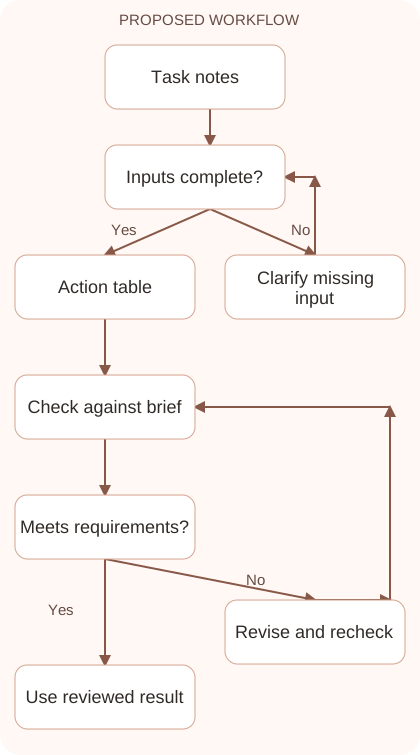
- Choose an output you can verify in a few minutes. A cleaned list, short explanation, or draft message is a better first task than an entire marketing strategy.
- Provide the relevant input and identify its status. Say which notes are confirmed, which are tentative, and which names or dates should remain unknown.
- Specify the format before asking for the answer. For action notes, request columns for task, evidence, owner, deadline, and unresolved questions rather than an open-ended essay.
- Compare every row with your input. Correct invented ownership, merged actions, missing conditions, and deadlines that sound reasonable but were never actually discussed in the meeting.
- Save the reviewed result and the successful prompt together. Repeat the same structure on another small task before expanding the process to important business work.
Workflow graph
Reusable prompt
Organize these website planning notes into an action table. Use only the supplied information. Separate confirmed decisions from suggestions. Columns: action, supporting note, owner, deadline, question. Write unknown when a field is missing. Do not perform any actions. Notes: [paste relevant notes].Replace the bracketed fields with approved information. Keep the prompt as a draft template: the person responsible for the work must still check its output before using it.
Quality checks and troubleshooting
- Every action can be traced to a note.
- Unknown details remain visible instead of becoming invented facts.
- The final result has a clear next step you can carry out yourself.
If the action list looks confusing, review its categories. A suggestion such as adding a newsletter belongs in discussion until approved, while a reported form error needs investigation before anyone can promise a repair. Practice with five notes and compare the result with a list you write manually. Investigate differences before saving the prompt. This makes your first exercise an opportunity to learn how the assistant organizes information rather than merely judge whether its output looks attractive. Expand to more complex notes only when the simple example preserves the facts correctly.
| Stage | What to prepare | What to verify |
|---|---|---|
| Input | Approved information and a defined question | Relevant evidence or a reproducible example |
| Draft | A result that follows the requested format | No hidden assumptions or unsupported promises |
| Review | A check against the brief and original material | Correct facts, behavior, and important conditions |
| Handoff | A usable result with remaining limits stated | The next person knows what was checked |
Practice and improve the workflow
Run a small practice cycle before expanding this workflow. Choose an input whose correct result you already understand, complete the task once, and compare the output with your own independent check. Record the prompt, the source or example, the mistake you found, and the correction you accepted. Change only one important variable on the next attempt so you can see whether the improvement came from clearer context, a better instruction, or a more useful review step.
Keep a reviewed example as your baseline. When the task, source material, or tool changes, repeat the checks most likely to be affected. If a recurring defect appears, revise the process instead of patching the final wording every time. Save the useful structure while removing previous client details and obsolete assumptions. This habit makes the workflow easier to maintain and easier to explain to a teammate who did not see the original conversation.
Download the plain-text prompt and review checklist for your own practice notes.
10 frequently asked questions
What should I try first in Claude?
Start with a small task whose answer you can check, such as reorganizing your own notes or editing a paragraph you already understand.
Do I need a complicated prompt?
No. Describe the goal, provide the input, and state the desired format. Add constraints when they solve a specific problem in the response.
Can I ask follow-up questions?
Yes. Refer to the part you want changed and explain the correction. For example, ask to keep the original deadline while shortening the wording.
Why does Claude sometimes make assumptions?
Your input may leave gaps. Explicitly request unknown labels and inspect the output for guessed names, dates, commitments, or unsupported explanations before using it.
Should I start a new chat for each task?
Use a fresh conversation when the subject or instructions change substantially. Keep related revisions together when the earlier context still matters to the current task.
Can I upload private work documents?
Check your organization’s rules and account settings first. Use only information you are allowed to share, and remove unnecessary client or personal details.
Does Claude automatically send the result?
A written draft does not mean it has been sent. Check the actual destination application and any configured tools before assuming an external action happened.
How do I know whether an answer is accurate?
Compare it with your source material. Check names, numbers, dates, conditions, and claims rather than judging accuracy by how polished or confident the answer sounds.
What should I do when the answer is too long?
Specify a shorter structure, such as five bullets or a three-column table. Preserve essential conditions while asking Claude to remove repetition and unnecessary background.
How can I improve without memorizing prompts?
Keep a few reviewed examples and record what made them useful. Reuse the input structure and review checklist rather than searching for a perfect universal phrase.
Resources and related guides
Official documentation supports current product details; the worked examples, diagrams, and review routines on this page are editorial recommendations. Check relevant account settings and organizational rules before using a feature with real work.
Continue with the Claude Prompting: Write Clear, Repeatable Instructions to develop a related skill, or use the Claude Projects: Organize Knowledge and Team Context for the next practical task. For another assistant’s approach, compare the related ChatGPT or AI workflow guide.