
Claude Projects can help organize work that repeatedly relies on the same background information. The practical challenge is deciding which material belongs in the shared context and how to keep it current. This guide explains a knowledge organization workflow for a small team, including source ownership, reusable instructions, and a review process that avoids turning outdated documents into confident answers.
What this workflow helps you do
This is a practical, evergreen workflow for claude projects. Start with a small example and move to real work only after the result meets your requirements. The examples are hypothetical teaching scenarios, not claims about measured customer outcomes. Interfaces, account capabilities, and policies can change; use the official resources below to check current product details.
Worked example
Consider an agency that answers similar questions about website packages. It has a current service sheet, a brand voice guide, and several old proposals with different prices. Loading everything together would create unnecessary ambiguity. Start with the approved service sheet and writing guide, then clearly mark their revision dates and owners. Use separate task conversations for drafting a client reply and planning an internal checklist. The common context should describe the service accurately; task-specific details such as the client’s requested deadline still need to be supplied and checked.
Important principles
A project is useful when its context has a coherent purpose. Keep a client workspace distinct from a general company reference collection if their facts or access rules differ. Shared instructions should define how to use sources, what to do when they conflict, and which questions require human confirmation. They should not claim that every possible document has been loaded or that every conversation automatically contains all past decisions. Verify the material visible to the current task before relying on it.
Step-by-step workflow
- Define the workspace purpose and intended users. Name the type of recurring work it supports, then identify the documents that are genuinely necessary for those tasks.
- Create a source inventory with owner, revision date, and approval status. Separate current reference documents from historical examples so old policies cannot quietly become the default answer.
- Write short project instructions describing audience, tone, source priority, and missing-information behavior. Make the rules specific enough that a teammate can review them without guessing your intention.
- Test the workspace with a known question and a deliberately missing fact. Confirm that the answer uses approved material and clearly asks for information that the sources do not contain.
- Schedule a regular source review in your normal team process. Replace outdated documents deliberately, record important changes, and recheck a small set of recurring questions after revisions.
Workflow graph
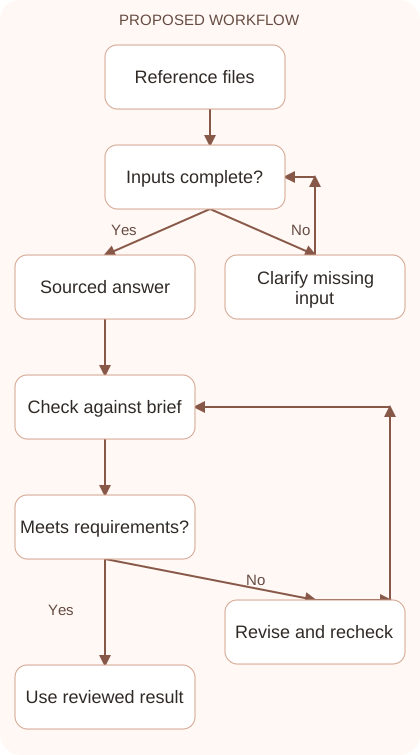
Reusable prompt
Use the approved service documents in this workspace to draft an answer to the question below. Name the source supporting each service claim. Prefer the latest approved revision. If sources conflict, show the conflict instead of choosing silently. Question: [client question].Replace the bracketed fields with approved information. Keep the prompt as a draft template: the person responsible for the work must still check its output before using it.
Quality checks and troubleshooting
- Reference material has a named owner and visible revision date.
- A missing fact produces a question rather than an invented policy.
- Access and sharing choices match the intended team or client audience.
Test a question whose answer differs between an old proposal and the current service sheet. The workspace should follow your approved source priority or show the conflict. Also test a policy question absent from the files. A missing reference should lead to a clarification instead of a confident invented answer. Record source ownership and revision status so later updates are deliberate. Keeping the collection small and accountable is often more useful than adding every document the team has ever produced.
| Stage | What to prepare | What to verify |
|---|---|---|
| Input | Approved information and a defined question | Relevant evidence or a reproducible example |
| Draft | A result that follows the requested format | No hidden assumptions or unsupported promises |
| Review | A check against the brief and original material | Correct facts, behavior, and important conditions |
| Handoff | A usable result with remaining limits stated | The next person knows what was checked |
Practice and improve the workflow
Run a small practice cycle before expanding this workflow. Choose an input whose correct result you already understand, complete the task once, and compare the output with your own independent check. Record the prompt, the source or example, the mistake you found, and the correction you accepted. Change only one important variable on the next attempt so you can see whether the improvement came from clearer context, a better instruction, or a more useful review step.
Keep a reviewed example as your baseline. When the task, source material, or tool changes, repeat the checks most likely to be affected. If a recurring defect appears, revise the process instead of patching the final wording every time. Save the useful structure while removing previous client details and obsolete assumptions. This habit makes the workflow easier to maintain and easier to explain to a teammate who did not see the original conversation.
Download the plain-text prompt and review checklist for your own practice notes.
10 frequently asked questions
When should I use a Claude Project?
Use one for recurring tasks that benefit from a consistent reference set. A one-off question with little background may be simpler in an ordinary conversation.
What documents should I include?
Include approved, relevant material such as service definitions and style guides. Avoid adding every historical file simply because it exists in your company folders.
Can a project replace my document management system?
Treat it as a working context, not your only archive. Keep the authoritative originals and revision history in the system your team already uses.
How do I handle conflicting sources?
Define source priority and ask Claude to show unresolved conflicts. A human owner should decide which policy or version applies before a client-facing answer is approved.
Should I include old proposals?
Only when they serve a clearly labeled historical or style purpose. Old prices and service terms can mislead a task that expects current approved information.
Are project instructions the same as each task prompt?
Project instructions describe recurring behavior and reference rules. The task prompt supplies the specific request, audience, deadline, and current facts for a particular deliverable.
How can I test project context?
Ask questions with known answers, then ask for a fact absent from the references. Check both accurate retrieval and the handling of missing information.
Can I share a project with clients?
Check the current sharing options and your account’s access rules. Share only material approved for that audience, and inspect the visible files before granting access.
How often should I update the sources?
Update them when the underlying policy or service changes. Assign a periodic review as a backup so obsolete reference material does not accumulate unnoticed.
What if Projects is unavailable in my interface?
Follow the current official help pages for your account. You can still use a clearly labeled reference brief in a normal conversation for a smaller workflow.
Resources and related guides
Official documentation supports current product details; the worked examples, diagrams, and review routines on this page are editorial recommendations. Check relevant account settings and organizational rules before using a feature with real work.
- Anthropic prompting guidance
- Anthropic guidance on reducing hallucinations
- Official Claude Projects guide
Continue with the Claude for SOPs: Document Processes Your Team Can Use to develop a related skill, or use the Claude for Customer Support: Draft Accurate Replies for the next practical task. For another assistant’s approach, compare the related ChatGPT or AI workflow guide.