
Claude PDF analysis is most useful when it helps you locate, organize, and compare information you can verify in the original document. A summary should preserve the distinctions that matter to your task, including conditions, exclusions, and uncertain passages. This guide explains a document-to-evidence workflow for reviewing a report without confusing a smooth summary with a complete or authoritative reading.
What this workflow helps you do
This is a practical, evergreen workflow for claude pdf analysis. Start with a small example and move to real work only after the result meets your requirements. The examples are hypothetical teaching scenarios, not claims about measured customer outcomes. Interfaces, account capabilities, and policies can change; use the official resources below to check current product details.
Worked example
Suppose you receive a project report with milestones, expenses, and unresolved issues. You need an overview for a planning meeting, not a replacement for the report. Ask Claude to extract the milestones into a table with supporting passages and page references when available. Check the first and last milestones yourself, and inspect any paragraph describing a delay. If a scanned page is unclear or a chart is not interpreted correctly, provide a readable extract or review that part manually instead of allowing the summary to gloss over the gap.
Important principles
Define what information you need before uploading a document. A request for every important detail leaves importance undefined. A request for delivery dates, blockers, and named owners gives you a reviewable target. Keep extracted facts separate from interpretations and recommendations. Page references help locate evidence, but they can still be wrong; compare them against the file. For regulated, contractual, or high-impact decisions, qualified review of the original material remains necessary.
Step-by-step workflow
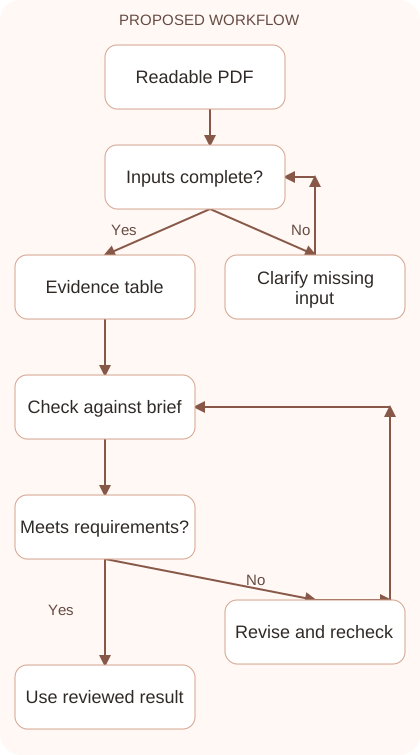
- Inspect the PDF yourself for readability, scope, and permission to share. Note whether it contains scanned pages, complicated charts, appendices, or confidential information unnecessary for the task.
- Ask for a document map before a detailed summary. Identify sections relevant to your question so you can focus extraction and avoid treating every page as equally important.
- Request a structured evidence table with claim, supporting passage, location, and uncertainty. Ask Claude to distinguish what the document says from what it merely suggests or leaves unresolved.
- Verify a sample of entries against the original, including difficult sections. Check dates, units, footnotes, negative statements, and conditions that can change the meaning of a finding.
- Write the final summary from the reviewed evidence table. Retain important caveats and reference the original document so readers can inspect the full context when needed.
Workflow graph
Reusable prompt
Analyze this project report for milestones, blockers, and owners. First list relevant sections. Then create an evidence table with a brief supporting passage and page or section reference. Mark unclear or missing details. Separate reported facts from your interpretation. Do not infer commitments that are not stated.Replace the bracketed fields with approved information. Keep the prompt as a draft template: the person responsible for the work must still check its output before using it.
Quality checks and troubleshooting
- Important dates and units match the original document.
- Conditions and exceptions survive the summary.
- Unclear scans or visuals are identified instead of silently ignored.
Pay attention to negative statements and conditional dates. A milestone described as not approved should not become a completed action in the summary. A date dependent on client review should retain that condition. For tables, check that a value belongs to the correct row and keeps its unit. When several dates appear, identify targets, revisions, and actual events rather than selecting the most frequent date. A useful summary shortens the route into the source without hiding distinctions that affect decisions.
| Stage | What to prepare | What to verify |
|---|---|---|
| Input | Approved information and a defined question | Relevant evidence or a reproducible example |
| Draft | A result that follows the requested format | No hidden assumptions or unsupported promises |
| Review | A check against the brief and original material | Correct facts, behavior, and important conditions |
| Handoff | A usable result with remaining limits stated | The next person knows what was checked |
Practice and improve the workflow
Run a small practice cycle before expanding this workflow. Choose an input whose correct result you already understand, complete the task once, and compare the output with your own independent check. Record the prompt, the source or example, the mistake you found, and the correction you accepted. Change only one important variable on the next attempt so you can see whether the improvement came from clearer context, a better instruction, or a more useful review step.
Keep a reviewed example as your baseline. When the task, source material, or tool changes, repeat the checks most likely to be affected. If a recurring defect appears, revise the process instead of patching the final wording every time. Save the useful structure while removing previous client details and obsolete assumptions. This habit makes the workflow easier to maintain and easier to explain to a teammate who did not see the original conversation.
Download the plain-text prompt and review checklist for your own practice notes.
10 frequently asked questions
Can Claude summarize a PDF?
Yes, supported file workflows can help summarize documents. Verify current upload requirements and inspect the original because extraction and interpretation can still contain errors.
What should I ask before a full summary?
Request a map of relevant sections and define the facts you need. This makes the later summary easier to check and less likely to miss your purpose.
Can I trust page references automatically?
No. Use them as navigation aids and verify important references in the original file, especially when page numbering differs between printed labels and PDF pages.
What if the PDF is scanned?
Check readability and provide a clearer extract when necessary. Do not assume every scanned word, handwritten annotation, or visual element was interpreted correctly.
How should I handle charts in a report?
Inspect the chart directly and check labels, units, axes, and notes. Compare any described trend with the actual visual before repeating it in your summary.
Can Claude compare two PDFs?
Define matching categories and request a comparison with evidence from each file. Check that differences reflect the documents rather than inconsistent extraction or naming.
Should I upload the whole report?
Provide the material necessary to preserve context while following sharing rules. If using an excerpt, explicitly state its scope so conclusions are not presented as comprehensive.
How do I stop a summary from losing exceptions?
Ask for conditions and exclusions in a separate column, then verify them manually. Shortening text should not remove clauses that change the practical interpretation.
Can a PDF summary replace expert advice?
Use it to organize questions and locate evidence. Decisions involving contracts, health, finance, or other consequential areas require appropriate review of the original material.
What is a useful final output?
A concise overview supported by a checked evidence table and a list of unresolved questions. Readers should be able to trace important statements to the document.
Resources and related guides
Official documentation supports current product details; the worked examples, diagrams, and review routines on this page are editorial recommendations. Check relevant account settings and organizational rules before using a feature with real work.
- Anthropic prompting guidance
- Anthropic guidance on reducing hallucinations
- Official Claude file upload guide
Continue with the Claude for Research: Verify Sources and Build Evidence to develop a related skill, or use the Claude Data Analysis: From Clean Data to Clear Findings for the next practical task. For another assistant’s approach, compare the related ChatGPT or AI workflow guide.