
Claude can support a writing workflow from outline to final edit, but the strongest results come from a clear brief and deliberate review. The goal is to produce useful communication that reflects your actual knowledge and audience. This guide explains how to develop a practical article, preserve factual boundaries, and improve the draft without replacing your voice with generic, repetitive language.
What this workflow helps you do
This is a practical, evergreen workflow for claude for writing. Start with a small example and move to real work only after the result meets your requirements. The examples are hypothetical teaching scenarios, not claims about measured customer outcomes. Interfaces, account capabilities, and policies can change; use the official resources below to check current product details.
Worked example
Imagine writing a tutorial about organizing a client feedback process. You have three verified steps: collect comments in one place, assign a responsible person, and confirm the revised output. Ask Claude for an outline that follows that sequence, then add an example from an anonymized project. When drafting, reject invented claims about saving a specific percentage of time. Instead explain the concrete benefit: teammates can see which comment is waiting for a response. The useful story comes from an observable workflow, not unsupported statistics or exaggerated promises.
Important principles
Separate thinking from polishing. First check whether the article answers the reader’s question, then inspect evidence and examples, then improve wording. Editing a structurally weak draft into elegant sentences rarely solves its underlying problem. Ask Claude to identify repetition, unsupported claims, missing steps, and sentences that require prior knowledge. Keep final editorial decisions with a person who understands the topic and can distinguish a helpful simplification from a misleading one.
Step-by-step workflow
- Write an audience brief that names the reader’s problem and desired outcome. List the source facts and experience you can actually support before asking for an outline.
- Review the outline for a logical path from problem to action. Remove sections that merely restate the introduction and add missing decisions the reader must make.
- Draft one section at a time using approved notes and examples. Keep placeholders for facts requiring verification instead of allowing confident language to conceal research gaps.
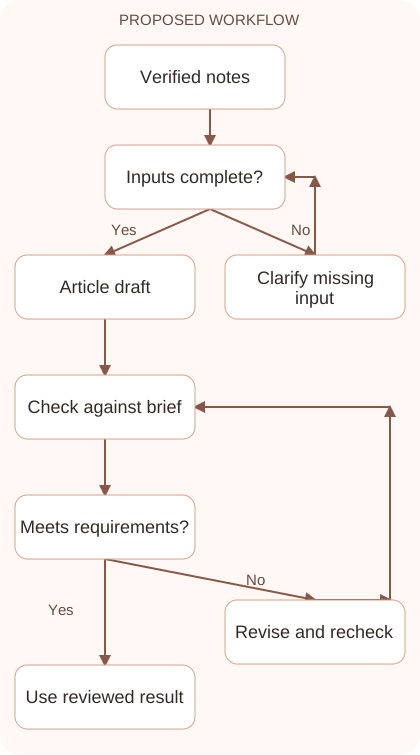
- Run an editorial review for factual support, practical detail, and tone. Ask for specific edits, then compare the revised version with the original requirements and evidence.
- Read the finished piece aloud and test its instructions. Correct awkward transitions, unclear references, and steps that sound easy in prose but fail when a reader follows them.
Workflow graph
Reusable prompt
Draft a practical section for [audience] explaining [task]. Use these verified notes: [notes]. Include one realistic example without inventing statistics or customer results. Use clear headings and concrete steps. Flag missing facts. Finish with an action the reader can try.Replace the bracketed fields with approved information. Keep the prompt as a draft template: the person responsible for the work must still check its output before using it.
Quality checks and troubleshooting
- The reader can carry out the described process.
- Examples and claims have an identifiable basis.
- Editing preserves the author’s intended meaning and voice.
A good revision request names both the defect and the content to preserve. Ask to shorten a repetitive opening while keeping the three approved steps, rather than simply requesting better writing. Keep a separate checklist for claims involving numbers, names, features, and quotations. If the premise changes during editing, revisit the outline and title. The final piece should present one coherent promise, supported by its evidence and examples, rather than a collection of polished sections written under different assumptions.
| Stage | What to prepare | What to verify |
|---|---|---|
| Input | Approved information and a defined question | Relevant evidence or a reproducible example |
| Draft | A result that follows the requested format | No hidden assumptions or unsupported promises |
| Review | A check against the brief and original material | Correct facts, behavior, and important conditions |
| Handoff | A usable result with remaining limits stated | The next person knows what was checked |
Practice and improve the workflow
Run a small practice cycle before expanding this workflow. Choose an input whose correct result you already understand, complete the task once, and compare the output with your own independent check. Record the prompt, the source or example, the mistake you found, and the correction you accepted. Change only one important variable on the next attempt so you can see whether the improvement came from clearer context, a better instruction, or a more useful review step.
Keep a reviewed example as your baseline. When the task, source material, or tool changes, repeat the checks most likely to be affected. If a recurring defect appears, revise the process instead of patching the final wording every time. Save the useful structure while removing previous client details and obsolete assumptions. This habit makes the workflow easier to maintain and easier to explain to a teammate who did not see the original conversation.
Download the plain-text prompt and review checklist for your own practice notes.
10 frequently asked questions
Can Claude write an entire article?
It can draft long text, but you should supply the brief, evidence, and editorial review. Length alone does not establish usefulness or accuracy.
How do I preserve my writing voice?
Provide a short sample and describe its important qualities. Review the draft for vocabulary and claims that you would not naturally use or support.
Should I draft everything at once?
For complex pieces, approve an outline first and work section by section. This makes factual and structural corrections easier to control.
How can I remove generic wording?
Ask for concrete examples, observable actions, and direct sentences. Replace broad promises with a specific explanation of what changes in the reader’s workflow.
Can Claude invent examples?
Use clearly labeled hypothetical examples when needed. Do not present invented customer stories, results, quotes, or personal experience as real events.
What should I review before grammar?
Check whether the article answers the question, follows a logical structure, and supports its claims. Grammar is easier to improve after those foundations work.
How do I handle uncertain facts?
Keep visible placeholders or a research list. Verify the information independently before converting a tentative draft into confident published wording.
Can I use Claude for proofreading?
Yes. Specify whether you want grammar fixes, clarity edits, or substantive changes. Review any correction that could alter technical meaning or important conditions.
Should I publish the first draft?
Review it against the brief and test practical instructions. A second pass often reveals missing steps, inconsistent terms, and claims hidden by fluent wording.
How do I reuse this process?
Save the audience brief, source checklist, and editorial questions. Reuse the workflow while replacing the examples and evidence for each new topic.
Resources and related guides
Official documentation supports current product details; the worked examples, diagrams, and review routines on this page are editorial recommendations. Check relevant account settings and organizational rules before using a feature with real work.
Continue with the Claude for SEO Content: Research, Draft, and Improve to develop a related skill, or use the Claude for Professional Emails: Clear Replies and Follow-ups for the next practical task. For another assistant’s approach, compare the related ChatGPT or AI workflow guide.