
Claude can help document a standard operating procedure when you provide the actual process and its exceptions. A useful SOP tells a teammate what to start with, what to do, how to judge completion, and when to ask for help. This guide explains a process-to-document workflow for handling client revisions, including a decision diagram, reusable prompt, and a practical trial run.
What this workflow helps you do
This is a practical, evergreen workflow for claude for sops. Start with a small example and move to real work only after the result meets your requirements. The examples are hypothetical teaching scenarios, not claims about measured customer outcomes. Interfaces, account capabilities, and policies can change; use the official resources below to check current product details.
Worked example
Suppose your team receives client feedback on website pages. The real process is to collect comments, separate corrections from new scope, assign the work, review the revision, and confirm completion. Ask Claude to draft an SOP from those facts. Include a decision point for a request that adds a new page: it should go to scope review rather than silently enter the revision queue. Have a teammate follow the draft with sample feedback. If they cannot tell who approves a scope change or where to record it, the SOP still needs work despite looking professionally formatted.
Important principles
Process documentation should describe observable actions and clear boundaries. Replace instructions such as ensure quality with specific checks, such as confirming that every approved comment has a corresponding change or documented response. Keep policy decisions with the responsible owner rather than allowing the draft to invent authority. Describe exceptions and escalation routes alongside the normal path. A procedure becomes useful when someone other than its author can follow it and produce the intended outcome.
Step-by-step workflow
- Record the actual process with the person who performs it. Capture inputs, systems, decisions, outputs, and known exceptions before trying to turn scattered notes into formal instructions.
- Define the procedure’s scope and trigger. Explain what starts the workflow, what work it covers, and which requests require a separate approval or process.
- Draft numbered actions with ownership and completion criteria. Keep steps small enough to perform and avoid vague verbs that require the reader to invent a method.
- Add exception handling and escalation. State where incomplete feedback, conflicting requests, or new scope should go, and identify the person authorized to resolve each category.
- Run the SOP with sample work and revise unclear instructions. Record the approved owner and review date so the document can be maintained when the workflow changes.
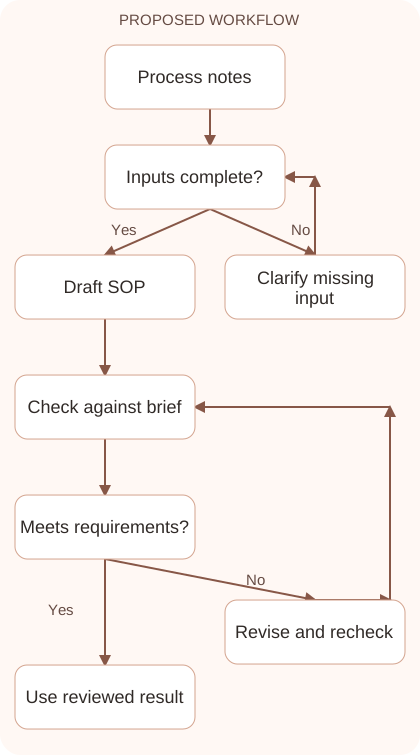
Workflow graph
Reusable prompt
Turn these approved revision-process notes into an SOP. Include purpose, trigger, inputs, numbered steps, owner responsibilities, completion checks, and exceptions. New scope requires review by [approved role]. Do not invent policies or permissions. Mark missing decisions as questions. Notes: [actual process].Replace the bracketed fields with approved information. Keep the prompt as a draft template: the person responsible for the work must still check its output before using it.
Quality checks and troubleshooting
- A teammate can follow the procedure without guessing.
- Exceptions lead to an identified escalation route.
- Completion criteria describe observable evidence rather than vague quality.
Test exceptions alongside the normal SOP path. Incomplete comments need clarification, conflicting comments need review, and new pages need scope approval. These different cases should not share a vague instruction to handle the issue. Ask a tester what they would do with each example and compare their answer with the approved process. If the next step remains unclear, revise the procedure before making it the team standard. Clear exception handling is part of reliable documentation.
| Stage | What to prepare | What to verify |
|---|---|---|
| Input | Approved information and a defined question | Relevant evidence or a reproducible example |
| Draft | A result that follows the requested format | No hidden assumptions or unsupported promises |
| Review | A check against the brief and original material | Correct facts, behavior, and important conditions |
| Handoff | A usable result with remaining limits stated | The next person knows what was checked |
Practice and improve the workflow
Run a small practice cycle before expanding this workflow. Choose an input whose correct result you already understand, complete the task once, and compare the output with your own independent check. Record the prompt, the source or example, the mistake you found, and the correction you accepted. Change only one important variable on the next attempt so you can see whether the improvement came from clearer context, a better instruction, or a more useful review step.
Keep a reviewed example as your baseline. When the task, source material, or tool changes, repeat the checks most likely to be affected. If a recurring defect appears, revise the process instead of patching the final wording every time. Save the useful structure while removing previous client details and obsolete assumptions. This habit makes the workflow easier to maintain and easier to explain to a teammate who did not see the original conversation.
Download the plain-text prompt and review checklist for your own practice notes.
10 frequently asked questions
Can Claude write an SOP?
It can structure and clarify a process from your notes. The process owner must validate the steps, responsibilities, policies, and exception handling.
What should I provide first?
Give the real trigger, inputs, tools, actions, decisions, outputs, and exceptions. Explain who currently performs and approves the work.
How detailed should each step be?
Make each step actionable for the intended reader. Add detail where a new teammate would otherwise need to guess how or when to proceed.
What is a completion criterion?
It is an observable condition showing a step or process is finished, such as every approved comment being addressed or assigned a documented response.
Should an SOP include screenshots?
Use screenshots when they clarify a difficult interface step, and maintain them when the interface changes. Text should still explain the underlying purpose and decision.
How do I handle new scope?
Write the approved escalation route and decision owner. Do not let a drafting assistant invent a policy or authorize work outside the actual agreement.
What if the existing process is inconsistent?
Document the differences and ask the responsible owner to decide. A polished SOP should not hide unresolved disagreements about how work is supposed to happen.
How do I test an SOP?
Give representative sample work to someone who was not the author. Observe where they hesitate, misinterpret a step, or cannot determine completion.
Who should maintain the document?
Assign a named process owner and a review routine. Update the SOP when tools, policies, responsibilities, or the actual workflow change.
Can I reuse one SOP template everywhere?
Reuse the structure, but tailor decisions, inputs, owners, and checks to each process. A universal template cannot supply the operational details itself.
Resources and related guides
Official documentation supports current product details; the worked examples, diagrams, and review routines on this page are editorial recommendations. Check relevant account settings and organizational rules before using a feature with real work.
Continue with the Claude for Project Management: Plans, Risks, and Updates to develop a related skill, or use the Claude AI Automation: Design Reliable Workflows for the next practical task. For another assistant’s approach, compare the related ChatGPT or AI workflow guide.