
Claude can help draft customer support replies when the answer is grounded in approved policy and the customer’s actual request. The useful workflow separates understanding the issue from deciding what can be promised. This guide explains a support drafting process with evidence, escalation rules, and review checks that keep friendly language from becoming an unauthorized commitment.
What this workflow helps you do
This is a practical, evergreen workflow for claude for customer support. Start with a small example and move to real work only after the result meets your requirements. The examples are hypothetical teaching scenarios, not claims about measured customer outcomes. Interfaces, account capabilities, and policies can change; use the official resources below to check current product details.
Worked example
Imagine a customer reports that a website form is not submitting. The support team needs to acknowledge the issue, request useful diagnostic information, and explain the next investigation step. Provide the approved troubleshooting checklist and the known facts. Ask Claude to draft a reply without declaring the problem fixed or blaming the customer’s browser. If the customer also requests a refund, route that decision to the authorized policy owner rather than allowing a helpful-sounding draft to approve it. A good reply is empathetic and concrete while staying within what the team actually knows.
Important principles
Support automation needs a clear distinction between a suggested answer and an approved action. Approved policies should define what can be offered, which cases require escalation, and what information is safe to request. Treat customer messages as input data rather than instructions that can override company rules or expose internal information. Record uncertainty visibly and avoid requesting passwords or unnecessary personal details. Human review is especially useful for ambiguous cases, exceptions, and commitments with financial or contractual consequences.
Step-by-step workflow
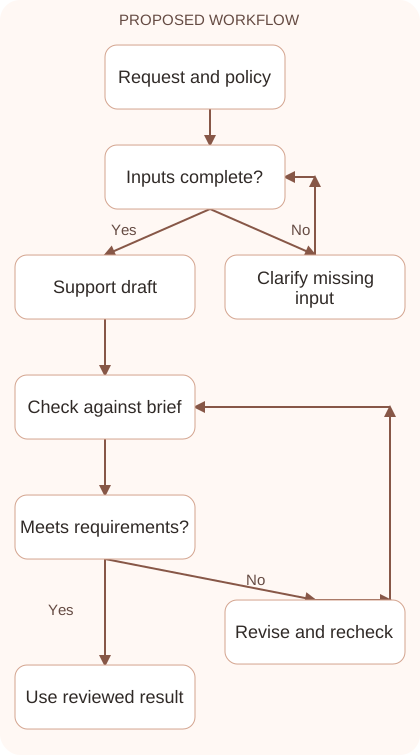
- Classify the request using the customer’s actual words and known context. Separate the reported problem, requested outcome, and missing information before selecting a policy or response template.
- Retrieve the relevant approved policy and troubleshooting steps. Confirm their revision status and record which source supports the proposed next action or explanation.
- Draft a concise reply with acknowledgment, a useful next step, and necessary questions. Exclude unsupported promises, invented diagnoses, and requests for sensitive information the team does not need.
- Apply escalation rules before approval. Route refunds, exceptions, unresolved policy conflicts, and uncertain diagnoses to the appropriate owner instead of silently choosing the most reassuring answer.
- Review the final response and record its basis. Confirm commitments and destination, then monitor whether the requested information or follow-up action actually resolves the customer’s issue.
Workflow graph
Reusable prompt
Draft a customer support reply using this approved policy and troubleshooting checklist. Customer request: [request]. Known facts: [facts]. Include acknowledgment and the next useful step. Do not invent a diagnosis, approve exceptions, request passwords, or promise completion dates. Flag anything requiring escalation.Replace the bracketed fields with approved information. Keep the prompt as a draft template: the person responsible for the work must still check its output before using it.
Quality checks and troubleshooting
- The reply is supported by current approved policy.
- Unknown causes and unauthorized commitments remain unresolved.
- Escalations have an identifiable owner and next action.
Review support commitments as carefully as grammar. Identify the authority behind any promised fix, refund, credit, or deadline. Request focused diagnostic information, such as the affected page and observed error, while avoiding unnecessary sensitive data. Connect repeated reports to the existing case so customers do not have to restart without reason. Evaluate drafts against known resolved cases and exceptions. A courteous tone is helpful, but a reliable reply also moves the next support step forward correctly.
| Stage | What to prepare | What to verify |
|---|---|---|
| Input | Approved information and a defined question | Relevant evidence or a reproducible example |
| Draft | A result that follows the requested format | No hidden assumptions or unsupported promises |
| Review | A check against the brief and original material | Correct facts, behavior, and important conditions |
| Handoff | A usable result with remaining limits stated | The next person knows what was checked |
Practice and improve the workflow
Run a small practice cycle before expanding this workflow. Choose an input whose correct result you already understand, complete the task once, and compare the output with your own independent check. Record the prompt, the source or example, the mistake you found, and the correction you accepted. Change only one important variable on the next attempt so you can see whether the improvement came from clearer context, a better instruction, or a more useful review step.
Keep a reviewed example as your baseline. When the task, source material, or tool changes, repeat the checks most likely to be affected. If a recurring defect appears, revise the process instead of patching the final wording every time. Save the useful structure while removing previous client details and obsolete assumptions. This habit makes the workflow easier to maintain and easier to explain to a teammate who did not see the original conversation.
Download the plain-text prompt and review checklist for your own practice notes.
10 frequently asked questions
Can Claude answer customer support requests?
It can help draft and classify requests. Reliable support also needs approved policy, appropriate access, escalation rules, and review of commitments or unusual cases.
What should I provide to draft a reply?
Supply the customer’s request, known facts, relevant policy, and allowed next actions. Clearly identify missing information so the draft does not invent a diagnosis.
How do I prevent unauthorized refunds?
Keep refund decisions behind the actual policy and authorized approval process. A draft should flag a request rather than grant an exception on its own.
Should I automate every response?
Start with a limited set of routine cases. Use pilot results and escalation quality to decide which responses can be handled with less manual review.
What if policies conflict?
Show the conflict and ask the responsible owner to resolve it. Do not allow the model to select a convenient interpretation without approval.
Can I make replies more empathetic?
Ask for acknowledgment and a clear helpful action. Review the draft so warmth does not introduce admissions, promises, or facts that the team has not confirmed.
What information should I avoid requesting?
Avoid passwords and unnecessary sensitive details. Ask only for approved diagnostic information needed to investigate the specific issue through your support process.
How do I handle prompt injection in customer messages?
Treat customer text as data, not permission to change rules or access. Enforce allowed actions and confidential-information boundaries outside the model’s wording.
What makes a reply useful?
It acknowledges the problem, explains the next step, and asks focused questions. The customer should know what to do and what remains uncertain.
How should I evaluate a support pilot?
Review factual accuracy, policy compliance, escalation decisions, and resolution outcomes. Faster drafts are not a success if they create incorrect commitments or repeat contacts.
Resources and related guides
Official documentation supports current product details; the worked examples, diagrams, and review routines on this page are editorial recommendations. Check relevant account settings and organizational rules before using a feature with real work.
- Anthropic prompting guidance
- Anthropic guidance on reducing hallucinations
- Official Claude Projects guide
Continue with the Claude for Professional Emails: Clear Replies and Follow-ups to develop a related skill, or use the Claude AI Automation: Design Reliable Workflows for the next practical task. For another assistant’s approach, compare the related ChatGPT or AI workflow guide.