
Claude can help make professional emails clearer when you give it the actual situation and the outcome you want. The aim is to communicate accurately and respectfully, not to make every message sound formal or persuasive. This guide explains a drafting workflow for client updates, follow-ups, and requests while preserving commitments, deadlines, and the sender’s intended meaning.
What this workflow helps you do
This is a practical, evergreen workflow for claude for professional emails. Start with a small example and move to real work only after the result meets your requirements. The examples are hypothetical teaching scenarios, not claims about measured customer outcomes. Interfaces, account capabilities, and policies can change; use the official resources below to check current product details.
Worked example
Imagine a client asks whether a website revision will be ready tomorrow. Your designer is still checking two changes, and no delivery date has been confirmed. Ask Claude to draft a short reply that acknowledges the request, explains the current review, and promises only a status update at a time you can actually meet. The draft should not say the project will definitely be delivered tomorrow merely to sound reassuring. A clear message might ask the client to confirm one missing piece of copy while explaining what the team is checking next.
Important principles
Email quality depends on factual boundaries as much as tone. Separate the recipient’s request from your confirmed response, and distinguish a question from a commitment. Keep one main action visible so the reader knows what to do. If an issue is sensitive, review the message carefully for blame, ambiguity, or unintended concessions. Claude’s draft should support your communication judgment; it should not automatically send a message or decide promises you have not authorized.
Step-by-step workflow
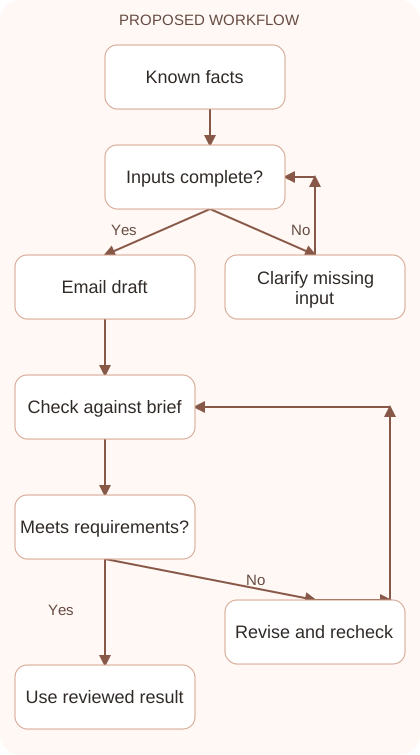
- Write the communication goal and list verified facts. Identify the recipient, relationship, current status, and any dates or promises that must remain exact.
- State the required action explicitly. Explain whether the email should request information, confirm a decision, provide progress, or propose a next step rather than combining every purpose.
- Ask for a concise draft in a suitable tone. Define a length or structure and prohibit unsupported commitments, invented explanations, and unnecessary defensive language.
- Review facts, implications, and tone before polishing. Confirm that every promise is intentional and that the recipient can distinguish what is complete from what is still pending.
- Add the actual subject and final details, then send through your normal process. Check recipient and attachments separately rather than treating an approved text draft as a completed email.
Workflow graph
Reusable prompt
Draft a concise client reply. Situation: [verified facts]. Goal: [one main action]. Confirmed commitments: [commitments]. Unconfirmed details: [unknowns]. Tone: professional and calm. Do not promise an unapproved deadline or invent reasons. Include a clear next step and a suitable subject line.Replace the bracketed fields with approved information. Keep the prompt as a draft template: the person responsible for the work must still check its output before using it.
Quality checks and troubleshooting
- Every deadline and commitment is intentional.
- The recipient can identify the next action.
- The draft does not imply a message or attachment was already sent.
Review reassurance phrases that can create unintended promises. Replace a broad statement about sorting everything tomorrow with the approved action, such as reviewing comments and sending a status update. Keep the client’s requested date separate from your commitment. In follow-ups, request the exact missing input and explain its purpose without blame. Reusable examples help with common situations, but names, dates, attachments, and commitments need a fresh check every time the structure is used.
| Stage | What to prepare | What to verify |
|---|---|---|
| Input | Approved information and a defined question | Relevant evidence or a reproducible example |
| Draft | A result that follows the requested format | No hidden assumptions or unsupported promises |
| Review | A check against the brief and original material | Correct facts, behavior, and important conditions |
| Handoff | A usable result with remaining limits stated | The next person knows what was checked |
Practice and improve the workflow
Run a small practice cycle before expanding this workflow. Choose an input whose correct result you already understand, complete the task once, and compare the output with your own independent check. Record the prompt, the source or example, the mistake you found, and the correction you accepted. Change only one important variable on the next attempt so you can see whether the improvement came from clearer context, a better instruction, or a more useful review step.
Keep a reviewed example as your baseline. When the task, source material, or tool changes, repeat the checks most likely to be affected. If a recurring defect appears, revise the process instead of patching the final wording every time. Save the useful structure while removing previous client details and obsolete assumptions. This habit makes the workflow easier to maintain and easier to explain to a teammate who did not see the original conversation.
Download the plain-text prompt and review checklist for your own practice notes.
10 frequently asked questions
Can Claude write professional emails?
It can draft and revise wording from your brief. You should verify the facts, commitments, recipient, and attachments before sending the final message.
What information should I include?
Provide the situation, recipient relationship, goal, verified facts, and approved commitments. Identify details that remain uncertain so the draft does not fill them in.
How do I make an email shorter?
Ask for one main purpose, a brief explanation, and a clear next action. Remove repetition while preserving dates, conditions, and necessary context.
Can I ask for a polite follow-up?
Yes. Supply the original request and elapsed context, then ask for a respectful reminder with a specific action rather than a vague request for an update.
How do I avoid promising too much?
List exactly what is confirmed and prohibit extra commitments. Review reassurance phrases because they can accidentally turn a tentative plan into a guarantee.
Should every email sound highly formal?
Match the relationship and purpose. Clear, direct wording is often more useful than elaborate formality that makes a simple request difficult to understand.
Can Claude improve my English?
Ask it to correct grammar while preserving your meaning. Review changes to make sure improved wording does not introduce a stronger promise or different implication.
What if the situation involves a disagreement?
Provide neutral facts and your intended outcome. Review the draft for accusations, unintended concessions, and wording that could escalate the conversation.
Does generating an email send it?
No. A draft is text until a sending action occurs through an actual tool or email application. Confirm the sent state in the destination system.
What should I check immediately before sending?
Check recipient, subject, attachments, names, dates, and promises. These details can create problems even when the email’s wording is polished and professional.
Resources and related guides
Official documentation supports current product details; the worked examples, diagrams, and review routines on this page are editorial recommendations. Check relevant account settings and organizational rules before using a feature with real work.
Continue with the Claude for Customer Support: Draft Accurate Replies to develop a related skill, or use the Claude for Writing: A Reliable Draft and Editing Workflow for the next practical task. For another assistant’s approach, compare the related ChatGPT or AI workflow guide.