
Claude can help a project manager organize information, draft updates, and identify planning gaps. The useful role is a structured assistant working from your team’s real commitments, not a substitute for ownership or communication. This guide explains how to turn a project brief into a reviewable plan with dependencies, risk questions, and a concise status update your stakeholders can understand.
What this workflow helps you do
This is a practical, evergreen workflow for claude for project management. Start with a small example and move to real work only after the result meets your requirements. The examples are hypothetical teaching scenarios, not claims about measured customer outcomes. Interfaces, account capabilities, and policies can change; use the official resources below to check current product details.
Worked example
Imagine an agency preparing a client website. Design must be approved before development finishes, and the client must supply final copy before launch review. Ask Claude to separate tasks, dependencies, assumptions, and missing decisions. If the brief does not name an owner for copy approval, mark it unassigned instead of giving the task to a convenient teammate. Build a status update from actual progress: what is complete, what is blocked, and what decision is needed. A confident schedule is not useful when it ignores the client’s pending input or the team’s available capacity.
Important principles
Planning quality depends on accurate inputs and visible uncertainty. Separate target dates from confirmed commitments and estimates from actual work completed. A risk is a possible future event; an issue is already affecting the project. Keep those categories distinct so the team knows whether it needs prevention or immediate resolution. Use Claude to improve structure and wording, then validate assignments, dates, and dependency logic with the people responsible before placing them in your project management system.
Step-by-step workflow
- Collect the approved scope, deliverables, constraints, and current status. Identify which dates are commitments and which are still proposals before asking for a schedule or update.
- Ask for a task breakdown with dependencies and unknown owners. Check whether each task produces a clear deliverable and whether the sequence reflects actual work requirements.
- Review capacity and estimates with the responsible team members. Do not treat generated durations as commitments or assume every person can work on every task immediately.
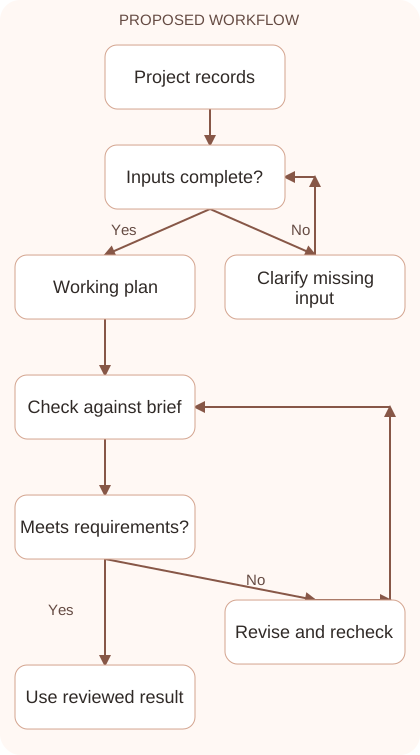
- Separate risks, current issues, and decisions required. Give each item a responsible owner and an appropriate next step, using real project information rather than imagined scenarios.
- Draft a stakeholder update from the reviewed plan. State progress, blockers, impact, and decisions clearly, then confirm the final message against current project records.
Workflow graph
Reusable prompt
Organize this approved website brief into tasks, dependencies, risks, current issues, and decisions needed. Keep unknown owners and dates visible. Distinguish target dates from confirmed commitments. Then draft a concise status update using only reported progress. Brief and status notes: [verified information].Replace the bracketed fields with approved information. Keep the prompt as a draft template: the person responsible for the work must still check its output before using it.
Quality checks and troubleshooting
- Assignments and dates are confirmed with responsible people.
- Dependencies reflect real prerequisites.
- The update distinguishes actual progress from estimates and proposals.
A project update should support a decision. If copy approval blocks development, explain what is needed and which schedule assumption depends on it. Avoid percentages unless your team has a consistent definition and supporting records. Completed deliverables may communicate progress more clearly. Keep target dates separate from agreed commitments. Record reasons for plan changes in the project system so later updates follow the same facts. Better wording can improve communication, but it cannot create capacity or agreement by itself.
| Stage | What to prepare | What to verify |
|---|---|---|
| Input | Approved information and a defined question | Relevant evidence or a reproducible example |
| Draft | A result that follows the requested format | No hidden assumptions or unsupported promises |
| Review | A check against the brief and original material | Correct facts, behavior, and important conditions |
| Handoff | A usable result with remaining limits stated | The next person knows what was checked |
Practice and improve the workflow
Run a small practice cycle before expanding this workflow. Choose an input whose correct result you already understand, complete the task once, and compare the output with your own independent check. Record the prompt, the source or example, the mistake you found, and the correction you accepted. Change only one important variable on the next attempt so you can see whether the improvement came from clearer context, a better instruction, or a more useful review step.
Keep a reviewed example as your baseline. When the task, source material, or tool changes, repeat the checks most likely to be affected. If a recurring defect appears, revise the process instead of patching the final wording every time. Save the useful structure while removing previous client details and obsolete assumptions. This habit makes the workflow easier to maintain and easier to explain to a teammate who did not see the original conversation.
Download the plain-text prompt and review checklist for your own practice notes.
10 frequently asked questions
Can Claude manage a project for me?
It can organize planning information and draft communication. Ownership, commitments, team coordination, and decisions still require responsible people and accurate project records.
What inputs make a plan useful?
Provide scope, deliverables, constraints, dependencies, available capacity, and current status. Clearly label missing decisions so they are not converted into invented assumptions.
Should I accept generated task estimates?
Treat them as discussion starters. Confirm effort and availability with the people doing the work before turning an estimate into a delivery commitment.
How do I distinguish risks from issues?
A risk may happen later; an issue is already happening. Keep them separate so prevention actions and immediate resolution work receive the appropriate attention.
Can Claude create a status report?
Yes. Supply verified progress, blockers, impacts, and decisions needed. Review the report so its tone does not make uncertain dates sound confirmed.
How do I prevent invented owners?
Tell Claude to mark unassigned work explicitly. Confirm assignments with the team instead of letting a model select whoever seems plausible from the context.
What should a dependency table show?
Show the task, prerequisite, output, and responsible owner. Check that the dependency represents an actual need rather than a convenient but unnecessary sequence.
Can I paste the plan into ClickUp?
Use it as a reviewed draft, then map tasks to your actual workspace fields and owners. Confirm permissions and dates before creating or changing assignments.
How can I keep updates concise?
Use a consistent structure: completed work, next work, blockers, and decisions. Include details that help the reader act rather than repeating the entire task list.
What should I review each week?
Review commitments, dependency changes, unassigned tasks, active issues, and pending decisions. Update the plan from real progress instead of merely regenerating polished wording.
Resources and related guides
Official documentation supports current product details; the worked examples, diagrams, and review routines on this page are editorial recommendations. Check relevant account settings and organizational rules before using a feature with real work.
Continue with the Claude for SOPs: Document Processes Your Team Can Use to develop a related skill, or use the Claude for Professional Emails: Clear Replies and Follow-ups for the next practical task. For another assistant’s approach, compare the related ChatGPT or AI workflow guide.