
Claude can help organize SEO content, but useful pages begin with a real reader need and trustworthy material. A keyword is a signal of intent, not a reason to repeat the same phrase throughout an article. This guide explains a research-to-publication workflow that connects topic planning, evidence, internal links, and helpful page structure without promising rankings or manufactured search performance.
What this workflow helps you do
This is a practical, evergreen workflow for claude for seo content. Start with a small example and move to real work only after the result meets your requirements. The examples are hypothetical teaching scenarios, not claims about measured customer outcomes. Interfaces, account capabilities, and policies can change; use the official resources below to check current product details.
Worked example
Suppose your website needs a guide to summarizing client documents. A reader may want practical instructions, limits, and a way to verify the summary. Ask Claude to map those questions into sections before drafting. Include your own checked workflow and link to a relevant document analysis guide rather than adding unrelated links for volume. A suitable title explains the task plainly, while the description previews the benefit. If you do not have live search data, do not label guessed phrases as proven high-volume keywords or claim that a title will guarantee more clicks.
Important principles
Search-oriented writing still needs editorial judgment. Distinguish the main question from supporting questions, and avoid making several pages compete for the same narrow purpose. Use headings to help readers navigate; use internal links when the destination completes a useful next step. A FAQ section should answer actual uncertainties rather than paraphrase the article title repeatedly. Metadata and structured data can describe a page, but neither substitutes for accurate content or guarantees a particular search appearance.
Step-by-step workflow
- Define the main reader question and the intended next action. Review existing pages so the new guide fills a genuine gap rather than duplicating an established article.
- Collect approved sources and topic-specific examples. If keyword research tools are available, record their actual data and date; keep estimates separate from measured search information.
- Ask for an outline matching the reader’s task. Include prerequisites, steps, limits, examples, and relevant questions, then remove headings that exist only to repeat keywords.
- Draft a descriptive title and honest summary. Add contextual internal links using natural anchor text, and verify that each destination supports the surrounding sentence’s promise.
- Review the rendered page on mobile, check every important link, and confirm images have useful descriptions. Track actual performance after publishing rather than declaring success before evidence exists.
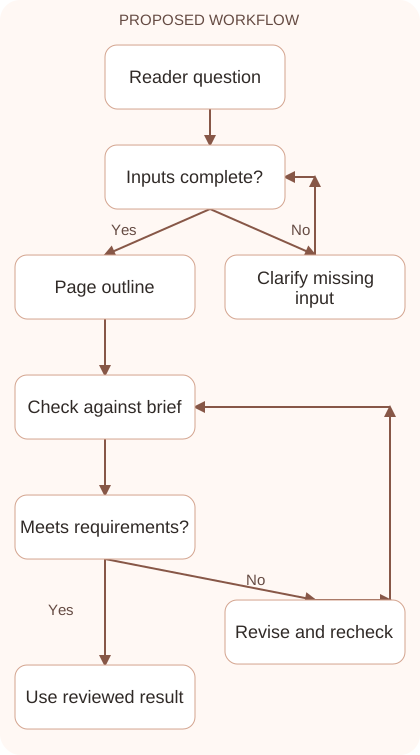
Workflow graph
Reusable prompt
Plan an article answering [reader question]. Audience: [audience]. Sources: [verified material]. Existing related pages: [links]. Suggest a task-focused outline, a concise title, and a truthful meta description. Do not invent keyword volumes, rankings, or performance claims. Identify useful internal link placements.Replace the bracketed fields with approved information. Keep the prompt as a draft template: the person responsible for the work must still check its output before using it.
Quality checks and troubleshooting
- The page has a distinct purpose compared with existing content.
- Metadata accurately describes what readers receive.
- Internal links resolve and make sense in their context.
Read each internal link together with its surrounding sentence and open the destination. A research link should provide a useful verification method; a website link should support the next publishing task. Avoid unrelated links added only for volume. Compare the new page’s purpose with existing guides so readers can understand why both exist. If two pages answer the same question with nearly identical instructions, improving one maintained guide may serve readers better than publishing another competing version.
| Stage | What to prepare | What to verify |
|---|---|---|
| Input | Approved information and a defined question | Relevant evidence or a reproducible example |
| Draft | A result that follows the requested format | No hidden assumptions or unsupported promises |
| Review | A check against the brief and original material | Correct facts, behavior, and important conditions |
| Handoff | A usable result with remaining limits stated | The next person knows what was checked |
Practice and improve the workflow
Run a small practice cycle before expanding this workflow. Choose an input whose correct result you already understand, complete the task once, and compare the output with your own independent check. Record the prompt, the source or example, the mistake you found, and the correction you accepted. Change only one important variable on the next attempt so you can see whether the improvement came from clearer context, a better instruction, or a more useful review step.
Keep a reviewed example as your baseline. When the task, source material, or tool changes, repeat the checks most likely to be affected. If a recurring defect appears, revise the process instead of patching the final wording every time. Save the useful structure while removing previous client details and obsolete assumptions. This habit makes the workflow easier to maintain and easier to explain to a teammate who did not see the original conversation.
Download the plain-text prompt and review checklist for your own practice notes.
10 frequently asked questions
Can Claude guarantee SEO rankings?
No. Use it to improve planning and drafts, then evaluate real search performance. Rankings depend on many factors outside a prompt or article template.
How do I find article keywords?
Start with audience questions and use actual research data when available. Treat Claude’s suggested phrases as ideas to investigate rather than verified search volumes.
Should I repeat the keyword in every heading?
Use clear headings that describe their sections. Repetition that makes navigation awkward is less useful than natural wording aligned with the reader’s task.
How many internal links should I add?
Add links that provide meaningful next steps. Check relevance and destination quality rather than aiming for an arbitrary number disconnected from the article.
What makes a good meta description?
It clearly explains the page’s scope and benefit without unsupported promises. Keep it concise and recognize that search engines may display a different snippet.
Do ten FAQs guarantee a rich result?
No. FAQs can help readers, but structured data and question counts do not guarantee special search displays. Keep every answer visible and relevant.
Can Claude analyze competing articles?
Provide accessible source material and ask for topic gaps, not copied language. Verify claims and contribute original examples or useful explanations of your own.
Should I add the year to every title?
Use a year when time-specific information matters and you will maintain it. Evergreen task guides often work better with a clear, stable description.
How do I avoid duplicate pages?
Compare reader intent, examples, and proposed headings with existing content. Merge overlapping material or choose a distinct task before commissioning another full article.
What should I measure after publishing?
Review impressions, clicks, reader engagement, and completed goals using your actual analytics. Compare periods carefully and account for other changes affecting the site.
Resources and related guides
Official documentation supports current product details; the worked examples, diagrams, and review routines on this page are editorial recommendations. Check relevant account settings and organizational rules before using a feature with real work.
Continue with the Claude for Writing: A Reliable Draft and Editing Workflow to develop a related skill, or use the Claude for Research: Verify Sources and Build Evidence for the next practical task. For another assistant’s approach, compare the related ChatGPT or AI workflow guide.