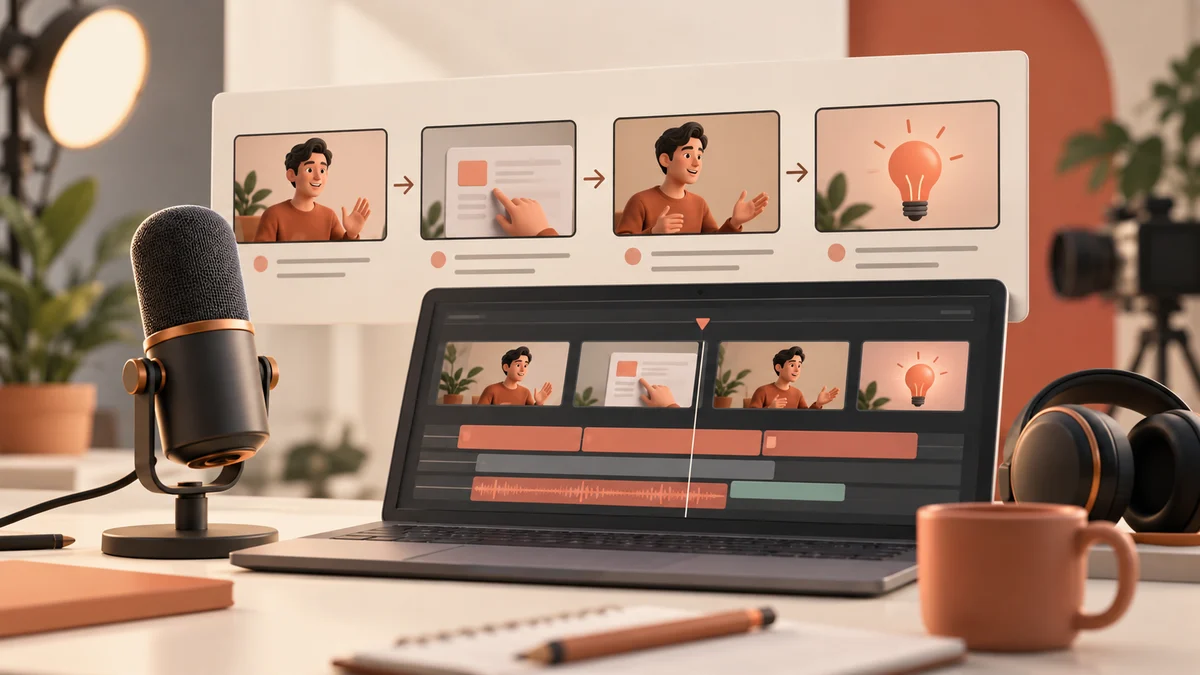
Claude can help plan YouTube tutorial scripts that give viewers a clear result and a believable path to achieving it. A useful script aligns narration with what actually appears on screen. This guide explains a tutorial workflow from audience question to verified demonstration, with a storyboard, prompt template, and review checks that reduce confusing edits and unsupported claims.
What this workflow helps you do
This is a practical, evergreen workflow for claude for youtube scripts. Start with a small example and move to real work only after the result meets your requirements. The examples are hypothetical teaching scenarios, not claims about measured customer outcomes. Interfaces, account capabilities, and policies can change; use the official resources below to check current product details.
Worked example
Suppose your video teaches viewers to organize blog article ideas with an AI assistant. Define a small outcome: a reviewed content outline with source questions and a publishing checklist. Ask Claude to draft narration alongside screen actions, then perform the demonstration yourself. If a tool fails or the interface differs, update the script to match reality instead of editing around the problem with an exaggerated claim. Your opening should preview the result accurately, and your title should promise the task shown in the video rather than imply effortless income or guaranteed rankings.
Important principles
Write for a viewer who cannot see your intentions. Describe the purpose of each important action, explain what input is needed, and show the result before moving on. Keep visual instructions and spoken narration in separate columns so production is easier. Avoid assuming that every viewer has the same subscription or interface. If a step depends on a feature, point viewers to current official guidance and provide a simpler alternative when it preserves the lesson’s goal.
Step-by-step workflow
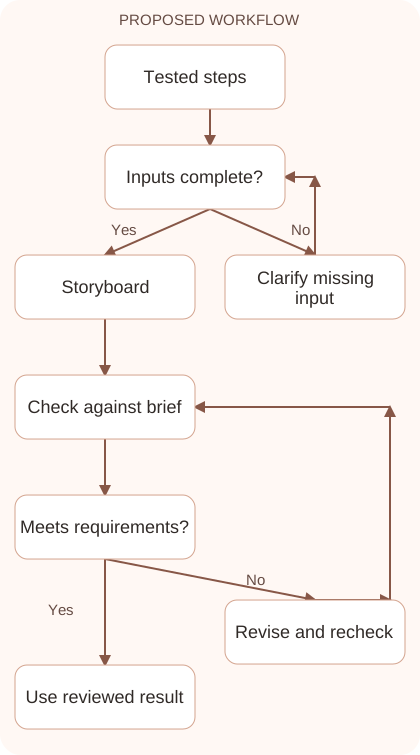
- Choose one audience question and a demonstrable outcome. Define what the viewer will have at the end so the script does not drift into unrelated tool features.
- Run the workflow once and record the actual steps. Capture prerequisites, important inputs, errors, and review decisions before asking for polished narration or a dramatic opening.
- Create a two-column storyboard with screen action and narration. Include short explanations of why each step matters and mark pauses where viewers need to inspect a result.
- Verify every claim and visual instruction against the demonstration. Remove promises that exceed what the video shows, and update steps affected by current interface differences.
- Review pacing, title, and description as a consistent package. The opening should set expectations the tutorial fulfills, and the closing should give a practical next action.
Workflow graph
Reusable prompt
Write a tutorial storyboard for [audience] showing [verified outcome]. Use these tested steps: [steps]. Columns: screen action, spoken narration, review note. Begin with an honest preview of the result. Avoid guaranteed income or performance claims. Mark prerequisites and any feature-dependent steps.Replace the bracketed fields with approved information. Keep the prompt as a draft template: the person responsible for the work must still check its output before using it.
Quality checks and troubleshooting
- Narration matches the actual screen demonstration.
- The title and opening promise the same achievable outcome.
- Prerequisites and review steps are visible to viewers.
Rehearse the script while performing the tutorial. Mark sentences that assume a result appears sooner than it actually does or omit meaningful input preparation. If an AI answer requires correction, include that review instead of implying the first output was perfect. This makes the lesson useful to beginners encountering the same problem. Keep the final title aligned with the demonstrated task, and provide verified resource links in the description for details that would interrupt the video’s pacing.
| Stage | What to prepare | What to verify |
|---|---|---|
| Input | Approved information and a defined question | Relevant evidence or a reproducible example |
| Draft | A result that follows the requested format | No hidden assumptions or unsupported promises |
| Review | A check against the brief and original material | Correct facts, behavior, and important conditions |
| Handoff | A usable result with remaining limits stated | The next person knows what was checked |
Practice and improve the workflow
Run a small practice cycle before expanding this workflow. Choose an input whose correct result you already understand, complete the task once, and compare the output with your own independent check. Record the prompt, the source or example, the mistake you found, and the correction you accepted. Change only one important variable on the next attempt so you can see whether the improvement came from clearer context, a better instruction, or a more useful review step.
Keep a reviewed example as your baseline. When the task, source material, or tool changes, repeat the checks most likely to be affected. If a recurring defect appears, revise the process instead of patching the final wording every time. Save the useful structure while removing previous client details and obsolete assumptions. This habit makes the workflow easier to maintain and easier to explain to a teammate who did not see the original conversation.
Download the plain-text prompt and review checklist for your own practice notes.
10 frequently asked questions
Can Claude write a YouTube script?
It can draft structure and narration from your brief. Test the demonstration and revise the wording so the video accurately reflects the actual workflow.
What should I provide for a tutorial?
Give the audience, outcome, tested steps, prerequisites, and important limitations. A real demonstration outline is more useful than only naming a tool.
How do I create a strong opening?
Show or describe the specific result viewers will achieve, then explain the problem it solves. Avoid promises the demonstration cannot substantiate.
Should the script include screen directions?
Yes. Separate screen actions from narration so recording and editing are easier. Explain which result should be visible before moving to the next step.
How do I handle interface changes?
Verify the workflow near recording time and update the script. Describe the underlying task so viewers can adapt when labels or feature placement differ.
Can Claude help with Urdu narration?
Provide the desired language, audience level, and preferred terminology. Review translations yourself or with a fluent speaker to preserve meaning and natural phrasing.
Should I claim a tool works in one click?
Only if the demonstrated task actually does. Include necessary input preparation and review so the claim does not hide meaningful effort.
How should I choose a title?
Describe the viewer’s task and useful outcome honestly. Treat suggested titles as creative options rather than guaranteed predictions of clicks or search demand.
What belongs in the description?
Summarize the demonstrated outcome, list relevant resources, and explain prerequisites. Keep links accurate and avoid adding claims that the video does not support.
What should the final review include?
Check factual claims, screen accuracy, pacing, language, and alignment between title and content. Confirm the viewer has a practical next step after watching.
Resources and related guides
Official documentation supports current product details; the worked examples, diagrams, and review routines on this page are editorial recommendations. Check relevant account settings and organizational rules before using a feature with real work.
Continue with the Claude for Writing: A Reliable Draft and Editing Workflow to develop a related skill, or use the Claude for SEO Content: Research, Draft, and Improve for the next practical task. For another assistant’s approach, compare the related ChatGPT or AI workflow guide.